
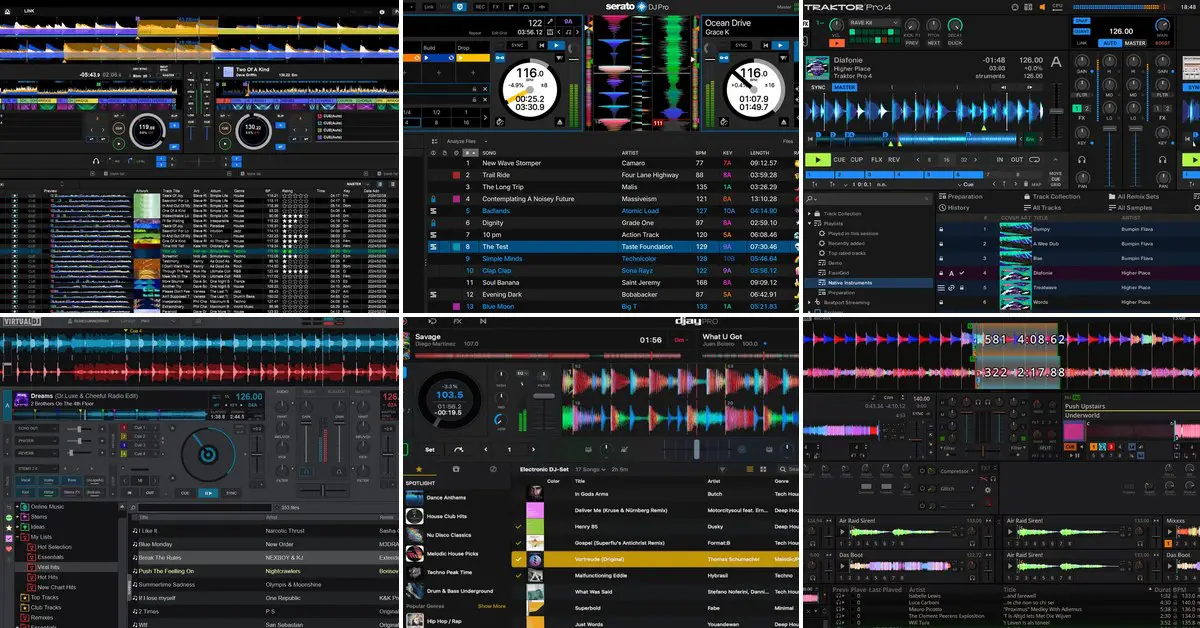
As a bedroom DJ I’ve pretty much gone through most of the available free and paid DJ software options using various entry-level DJ controllers, including a lot of legacy gear and custom mapped MIDI solutions. Here is what I learned about each of the most popular options on the market during that time, and how they have evolved over the years. Let’s begin with the short version.
Want only free options instead? Here they are: Best Free DJ Software (For Windows and macOS)
Top DJ Software Prices & Features At A Glance
Here are the six programs that I cover below, side by side, in a quick comparison. Prices are the official US prices at the time of writing (November 2026), so they might differ slightly in your region, and they do change from time to time, so always check the official pages before you make any decisions.
Swipe the table sideways to see all columns.
| Software | Free version | Paid options | Hardware unlock | Stems | DVS | Platforms |
|---|---|---|---|---|---|---|
| Rekordbox | Free planControllers need Hardware Unlock or a plan | Core $10/mo, Creative $15/mo, Professional $30/moBilled yearly | YesPioneer DJ / AlphaTheta | 3 or 4 stemsVocal, inst, bass, drums | YesUnlocked by some devices or a plan | Windows, macOS, iOS, Android |
| Serato DJ | Serato DJ Lite | Pro $299 or $11.99/moSuite $499 or $14.99/mo | YesLite or Pro, depending on the controller | 4 stems, in Lite tooVocals, melody, bass, drums. Stems FX in Pro | YesDVS expansion, in Suite | Windows, macOS, iOS |
| VirtualDJ | FreeWithout controllers | Home $4/mo, Pro $19/mo | No | 4 stemsVocals, melody, bass, drums. Real-time on fast computers, or prepared in advance | Yes | Windows, macOS |
| Traktor | No | Traktor Play $49, Pro 4 $149One-time | NoLicense included with some controllers | 4 stems in Pro 4Drums, bass, instruments, vocals. Play: drums on/off only | YesPro 4 only | Windows, macOS |
| djay | Yes | djay Pro $6.99/mo or $49.99/yrAll platforms | No | 4 stems, in ProVocals, drums, bass, harmonics (Neural Mix) | YesWindows | Windows, macOS, iOS, Android |
| Mixxx | Fully free | None | Not needed | STEM files only4-stem files, from 2.6 (beta) | Yes | Windows, macOS, Linux |
Quickstart – If You Don’t Know Where To Begin
The two most popular software options on the market are currently Rekordbox and Serato DJ.
Rekordbox is the in-house DJ software of AlphaTheta (formerly Pioneer DJ), and usually the natural pick if you use their controllers, all-in-one systems or the CDJ players you’ll find in most clubs. It’s free to start with, and most Pioneer DJ and AlphaTheta controllers unlock its Performance mode as soon as you plug them in. This is called “hardware unlock”.
The second one, Serato, was traditionally the go-to choice for scratch and open-format DJs. Today it supports one of the widest selections of third-party DJ hardware, from Rane and Numark to Hercules and Pioneer DJ controllers, and it comes in a free Lite version and a paid Pro version. Here, similarly, many dedicated devices are also able to unlock its full version when connected to your computer.
With that said, you can easily use either of these programs, as well as the other software you can find on the list below for club DJ sets, scratch routines, public events, and much more. While historically the different pieces of software stemmed from different backgrounds and were more specialized when it comes to their feature sets, today what matters much more is the hardware choice.
While most DJ software these days is able to handle, for instance, DVS workflows (albeit some programs do need additional expansions for that), first and foremost you need proper turntables to get started with that. The same goes for attempting to learn to scratch on a DJ controller with motorized platters. While most software will support these with the same or very similar supported feature sets, your hardware choice is what’s most important here.
As the main “core” of each piece of software here will these days be largely the same and close to equally capable, the main differences are hidden mostly in:
- Hardware compatibility – which controllers, mixers and standalone units officially work with a given program, and whether they unlock its paid version once connected.
- The pricing scheme and expansions/subscription policies – for example Rekordbox relies on hardware unlock and optional subscription plans, while Serato offers a free Lite version, a Pro version you can buy or subscribe to, and paid expansions on top of that.
- Extra features (sometimes unique to a given program) – such as USB exports for CDJ players in Rekordbox, the sandbox mode and video mixing in VirtualDJ, or Remix Decks in Traktor.
- Stems separation algorithms – all of the major commercial programs can now split tracks into vocals, drums and other parts, but the number of stems, the controls and the sound quality differ.
- And sometimes, a few things more – such as supported streaming services, mobile versions, and the library formats your music can be exported in. Always take note of the extra features that you need for your particular setup or workflow.
So, with that said…
Hardware Compatibility Is Where You Start
Once again, the choice of software will in most cases be secondary to your main choice of DJ hardware. Whether you want to dabble in DVS setups, play using a “traditional” DJ controller, or use custom MIDI devices to control your mixes, you will probably start out by choosing the equipment you like.
The good news is that in most cases (excluding highly customized non-standard MIDI controller setups), you’ll be able to use either of the programs listed below and get a very similar experience in terms of the base software functionality.
All of the positions below have been slowly converging over the years in terms of their feature sets, and in a natural progress of rivalry have become very close to each other when it comes to the things you can do with them with compatible DJ hardware.
It’s still important to note that, quite understandably, when you pick up a DJ controller that’s not natively compatible with a given piece of software, you will be locked out of using it. So, if you’re reading this and you already have some strong preferences, or are curious about the features unique to some of the mainline DJ software available on the market today, you can learn much more about that below.
To put some numbers on it, at the time of writing Rekordbox’s own list of compatible DJ units includes 21 DJ controllers and all-in-one systems, all of them made by Pioneer DJ and AlphaTheta. Serato says its Pro version works with over 150 pieces of DJ hardware from many different brands, and VirtualDJ lists over 300 supported controllers.
Rekordbox, Traktor and DJUCED support far fewer controllers for a simple reason. They come from hardware makers (AlphaTheta, Native Instruments and Hercules), so they’re built around their own controllers first. Atomix, the company behind VirtualDJ, makes only software, so supporting as much hardware as possible is pretty much its whole business model, and its list includes some very old, sometimes almost esoteric picks.
A good example of how much this has changed over the years is Pioneer DJ’s own DJ controller lineup. Of the 31 Pioneer DJ controllers released between 2011 and 2019 that are in the Find My DJ Gear database, 16 are officially supported only by Serato DJ today, 5 only by Rekordbox, and just 3 by both. Of the 14 Pioneer DJ and AlphaTheta models released since 2020, however, 13 support both pieces of software, and the only exception is the scratch-oriented DDJ-REV1, the only Serato-dedicated Pioneer DJ/AlphaTheta controller of the last 6 years.
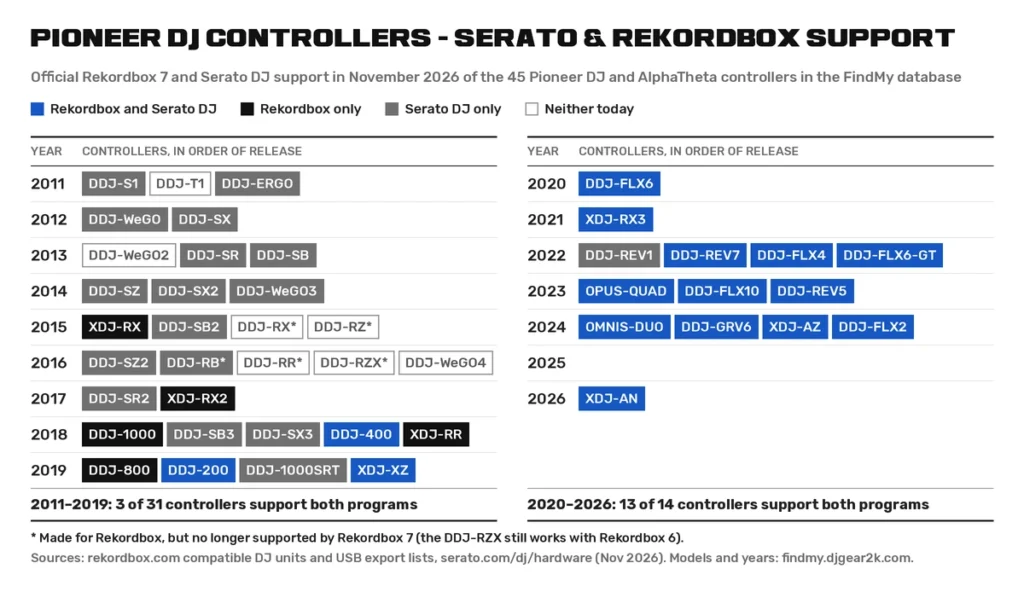
If you’re looking at used or older gear, check what’s supported today first. Rekordbox 7 has dropped some of Pioneer DJ’s own older controllers, such as the DDJ-RB, DDJ-RR, DDJ-RX and DDJ-RZ, and AlphaTheta says they’re no longer guaranteed to work. The DDJ-RZX still works with Rekordbox 6, which you can download from the official archive, but not with Rekordbox 7. Serato usually keeps older hardware on its list for much longer (it still lists the DDJ-RB, for instance), and VirtualDJ supports all of these older models.
Still, Rekordbox officially works only with Pioneer DJ and AlphaTheta hardware, so they’re the only controllers that support both of the big two. If you’d like to keep both open for your DJ sets, here are my DJ controllers compatible with both Serato and Rekordbox.
If you don’t know what kind of DJ controller would suit you best yet, I’ve prepared a neat lineup just for you here: The Best DJ Controllers This Year: 8 Picks for Every Type of DJ
Best and Most Popular DJ Software In 2026 – The List
1. Rekordbox
Rekordbox is generally meant for club DJs who often work with hardware that makes use of the Rekordbox library export formats to handle music files alongside their metadata.
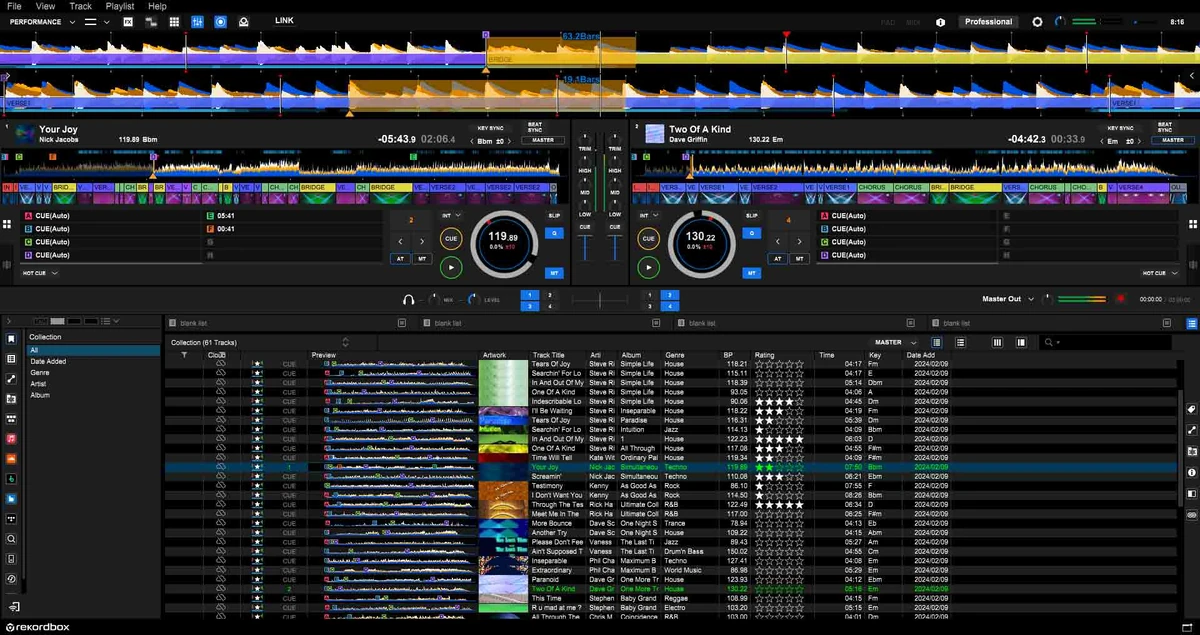
Its main advantage is the ability to perform track exports to your USB drives that can later on be used with Rekordbox library-compatible equipment such as the CDJ players or compatible all-in-one DJ controllers.
In a word, if you prefer using software other than Rekordbox, and at the same time at some point you’ll have to make use of a standalone controller or a CDJ player that requires the audio files to be exported using the Rekordbox library format, you might have to install Rekordbox on your system anyway, to handle the proper exports.
This, however, has become a little less strict recently. Since October 2025, the newer OneLibrary format (formerly Device Library Plus) is also supported by djay Pro, which can export USB drives for players like the CDJ-3000X, XDJ-AZ or OPUS-QUAD, and Native Instruments announced the same for Traktor. For older players that only read the classic Device Library, Rekordbox is still the way to go.
While these days the feature sets of both Rekordbox and Serato largely overlap, this is one of the main things that makes these two sufficiently different.
Rekordbox-compatible devices make use of the hardware unlock mechanism. This means that once you connect a DJ controller compatible with the software to your computer, Performance mode and the features supported by that device will unlock automatically. Some features, such as DVS, are only unlocked by certain devices.
Unlike Serato DJ, which is up next, Rekordbox doesn’t make use of expansion packs for unlocking more software features. Instead, it relies on an optional tiered subscription model offering Core, Creative and Professional tiers for users that require additional perks such as cloud library sync, EDIT mode, Dropbox cloud storage and, if your hardware doesn’t unlock it, full DVS control.
Since October 2026 there’s also a separate Studio Plan, a subscription that comes with the Bitwig Studio Essentials DAW and reads your Rekordbox library, in case you’d like to start making your own edits and remixes. It’s independent of the DJ plans above, so you don’t need it to DJ.
To make it clear, if you own a hardware unlock device for Rekordbox, you don’t have to purchase a subscription at any point if you don’t find yourself needing any of the extra features that come with the additional offers. Without a hardware unlock device or a paid plan, however, the Free plan won’t let you control Rekordbox with your DJ equipment, and you’ll be limited to mixing with your mouse and keyboard.
Rekordbox also has a free mobile app for iOS and Android, which works with controllers like the DDJ-FLX4, DDJ-FLX2 and DDJ-GRV6, if you’d like to DJ straight from your phone or tablet.
See more here: Rekordbox vs. Serato DJ Pro – Which One Is Better?
2. Serato DJ
Serato DJ used to be aimed mostly at scratch-oriented DJs and setups, as well as “open-format” DJs. These days, while the software retains some of its initial specializations, its feature set is largely similar to the one of Rekordbox, and the choice between the two is largely a matter of preference and one’s hardware-dictated affinity with the Rekordbox ecosystem.
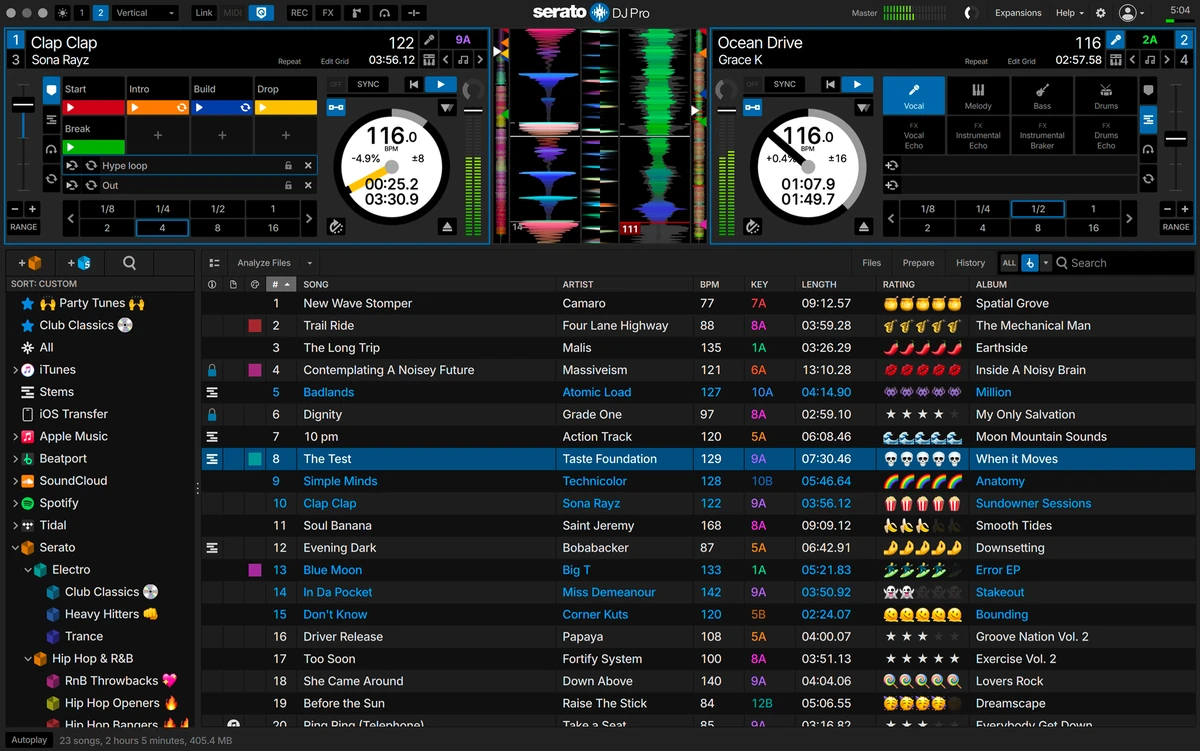
The two are closer than you might think, though. In 2023 AlphaTheta announced it would buy Serato, but the New Zealand Commerce Commission blocked the deal in 2024, so Serato remains an independent company, still partnering with AlphaTheta and many other hardware makers.
For a very long time, Serato also had a great deal of Pioneer DJ controllers locked into its ecosystem, which strengthened the division between Rekordbox and Serato when it comes to hardware compatibility. Pioneer DJ made separate controllers for each program, like the Serato-only DDJ-SR and DDJ-SB3 or the Rekordbox-only DDJ-RR and DDJ-1000 (with the DDJ-1000SRT as its Serato version), and you couldn’t simply switch from one to the other. As you saw in the chart above, that has mostly changed, and the only Pioneer DJ controller released since 2020 in the database that still works with Serato alone is the DDJ-REV1.
But there is also a not-so-small catch here. Serato, as things are now, is split into two different desktop versions.
Serato DJ Lite is the free and much limited version which you’ll be able to use with most if not all compatible DJ controllers out of the box.
Serato DJ Pro, on the other hand, is the near-fully-featured version of Serato with all the most important functions available out of the box, aside from a few features that you can get additionally through separate expansion packs.
Some of the more advanced DJ controllers do unlock Serato DJ Pro once connected to your computer, much like hardware unlock devices unlock Rekordbox. A few examples would be the Rane FOUR, the Denon DJ SC LIVE 4, the Roland DJ-707M or the Reloop Mixon 8 Pro.
Serato DJ Lite
Serato DJ Lite is a cut-down version of Serato DJ Pro that comes with quite a few limitations, which might not be a problem for beginner DJs, but are a real pain if you have used any other piece of DJ software before to a larger extent.
The main disadvantages that the Lite version of Serato brings about are the lack of a built-in recording function, 4 hot cues instead of 8, only 4 sampler slots, and no quantize, saved loops, beat jumping or Stems FX. It also doesn’t work with CDJs or club mixers.
A few other things to keep in mind here are that Lite now includes real-time Serato Stems, a Practice Mode for laptop-only mixing without any controller, and streaming from Apple Music, Beatport, SoundCloud, Spotify and TIDAL. So it’s not nearly as bare-bones as it was a few years back.
It’s still limited in terms of its feature set, and in general considered a stepping stone to either an upgrade to Pro, or another piece of DJ software compatible with your controller. You can find more details about it in my full Serato DJ Lite review.
Serato DJ Pro
Serato DJ Pro is the full version of Serato, now at version 5, with 4 decks, 8 hot cues, set recording, Stems FX, cue loops and all the other performance features that Lite lacks.
If you need more, Serato DJ Suite bundles Pro with every expansion (DVS, Pitch ‘n Time DJ, Video, Flip, Play and the Advanced FX), along with Serato DJ for iOS and Serato Studio.
As mentioned before, Serato DJ Pro can be automatically unlocked by DJ controllers made for it, such as the DDJ-FLX10, DDJ-REV7, DDJ-GRV6 or Rane ONE. Controllers made for Serato DJ Lite, such as the DDJ-FLX4 or DDJ-400, can still run Pro, but you’ll need a separately bought license or a subscription for that.
Serato Play is one of the expansions, and it lets you use Serato DJ Pro with just your laptop, without any DJ hardware connected. It’s included in Serato DJ Suite.
Since October 2026 there is also Serato DJ for iOS, Serato’s first app for iPhone and iPad. It has a free, feature-limited version and a $149 one-time unlock, it’s included in Serato DJ Suite, and it works with more than 120 controllers, mixers, turntables and standalone units, including the DDJ-FLX4 and DDJ-GRV6.
See more here: Serato DJ Lite vs. Pro (12 Most Important Differences)
3. VirtualDJ
VirtualDJ, made by Atomix, has come a long way over the years. It’s progressed from an app most commonly associated with laptop-only DJing, to full-fledged DJ software compatible with hundreds of DJ controllers on the market, with the list constantly growing. It’s no accident that it supports by far the most controllers of all the programs here, as it extends its support to many legacy devices that no other DJ software officially supports anymore.
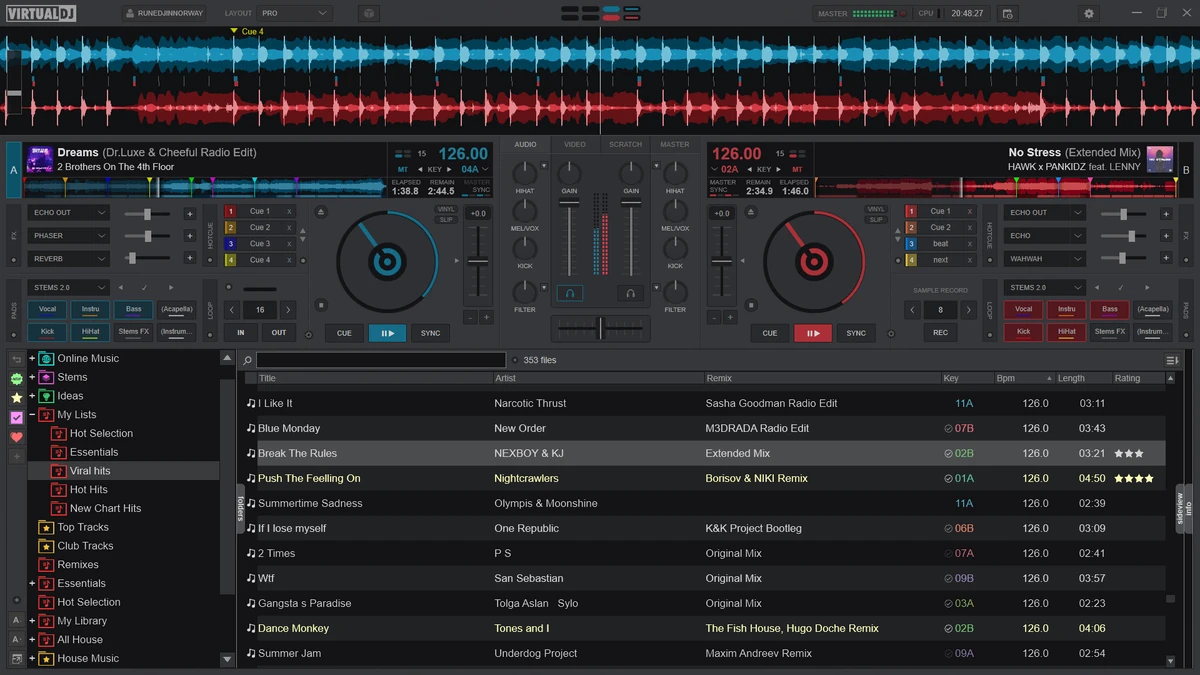
It’s also known for its great control mapping and remapping capabilities, which makes it a great option when you’re using some older DJ controllers that need to be either tweaked or fully reintegrated when it comes to their MIDI mappings, or if you plan to DJ using a setup that includes a lot of non-standard MIDI-mappable devices.
With the meaningful updates that VirtualDJ has been getting, the software now has support for DVS, real-time stem separation, video and karaoke mixing, streaming services like Spotify, and much more. The 2026 versions also added things like AI track search using plain-language prompts, fluid beatgrids for tracks with drifting tempos, and, in the latest update, Shoutouts, which can generate voiceovers or replace lyrics in a playing track.
It’s also highly customizable when it comes to its user interface, letting you not only freely move and relocate many of the UI parts, but also make use of many interesting community-made software skins, which were one of the main things you saw with your mind’s eye back in the day when thinking “VirtualDJ”.
The main limitation here is that VirtualDJ does not have compatible “hardware unlock” devices, and instead, it relies on you having to purchase a paid license to use external DJ controllers with it for periods longer than 10 minutes per session (which is the current default controller demo time limit).
See more here: Virtual DJ Software Review
4. Traktor
Traktor by Native Instruments is in a way in a separate league here, as it’s the only one of the major programs that was built first and foremost around its maker’s own hardware. Traktor Pro 4 is sold as a one-time purchase, and it brought built-in stem separation powered by iZotope’s RX technology, along with flexible beatgrids.
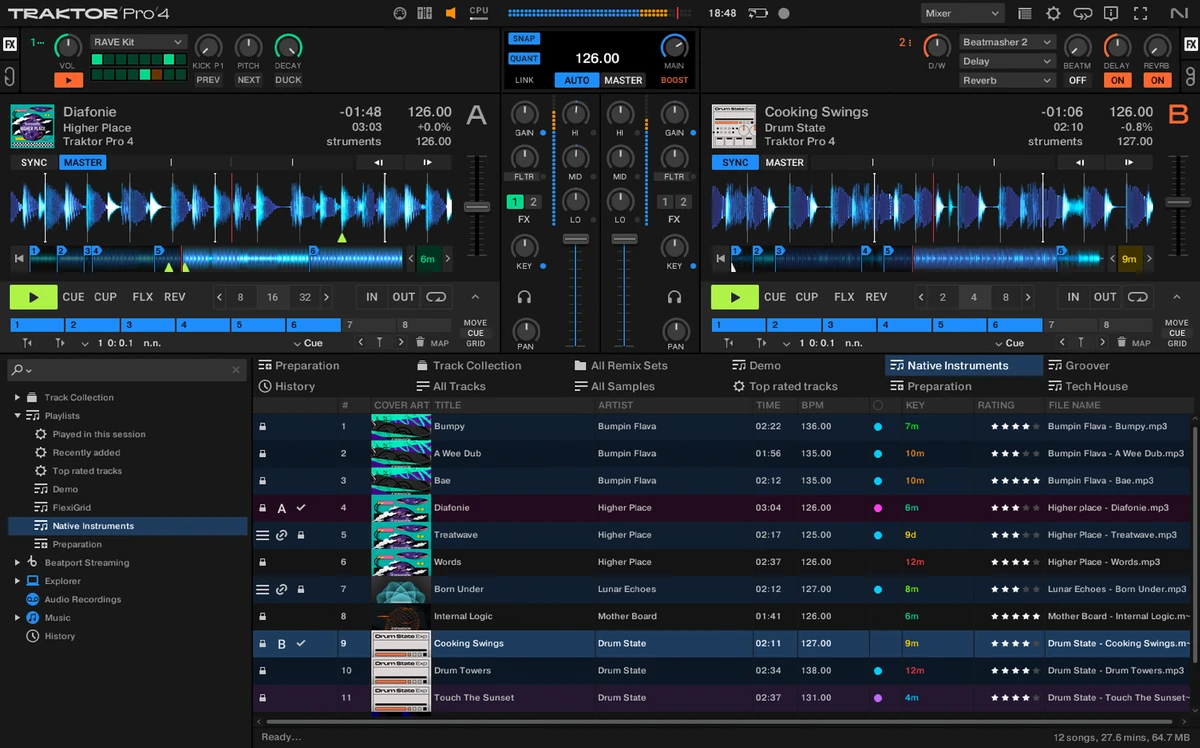
It’s also the native software for the NI Traktor Kontrol line of DJ controllers, which is important to mention here, as if you decide to get one, you will be tied quite closely to this ecosystem. While the dedicated equipment supports VirtualDJ and has community mappings for Mixxx, it remains largely incompatible with Rekordbox. Select models like the S2 MK3 and S3 do feature official plug-and-play support for Serato DJ Lite (with Serato DJ Pro as a paid upgrade).
Traktor Play, launched in late 2025, is a streamlined version of Traktor that costs much less than Traktor Pro. It’s limited to two decks and lacks things like DVS, Remix Decks and the per-stem volume, filter and FX controls, but it still has a simpler version of the stem separation, with a single button that mutes the drums, along with Beatport and Beatsource streaming. More importantly, it’s where Native Instruments opened up to other brands’ hardware, as it works with controllers like the AlphaTheta DDJ-FLX2, the Pioneer DDJ-FLX4 (which also gets you a free Traktor Play license) and Reloop’s Buddy and Ready. If you outgrow it, you can easily upgrade to Traktor Pro 4 later on and pay only the price difference between the two.
Much like VirtualDJ, Traktor has excellent custom MIDI mapping capabilities, so if you know that you’re going to be using devices that might need complex control configuration, or third-party controllers that don’t have either an official or a community-made map available, it’s another great option to consider. One thing it still lacks is Spotify support.
See more here: Serato DJ Pro vs. Traktor – DJ Software Comparison
5. Algoriddim djay
Algoriddim djay has risen in popularity in recent years, graduating from one of many mobile-only DJ apps to a piece of software officially supported and recommended by many DJ hardware manufacturers, including AlphaTheta.
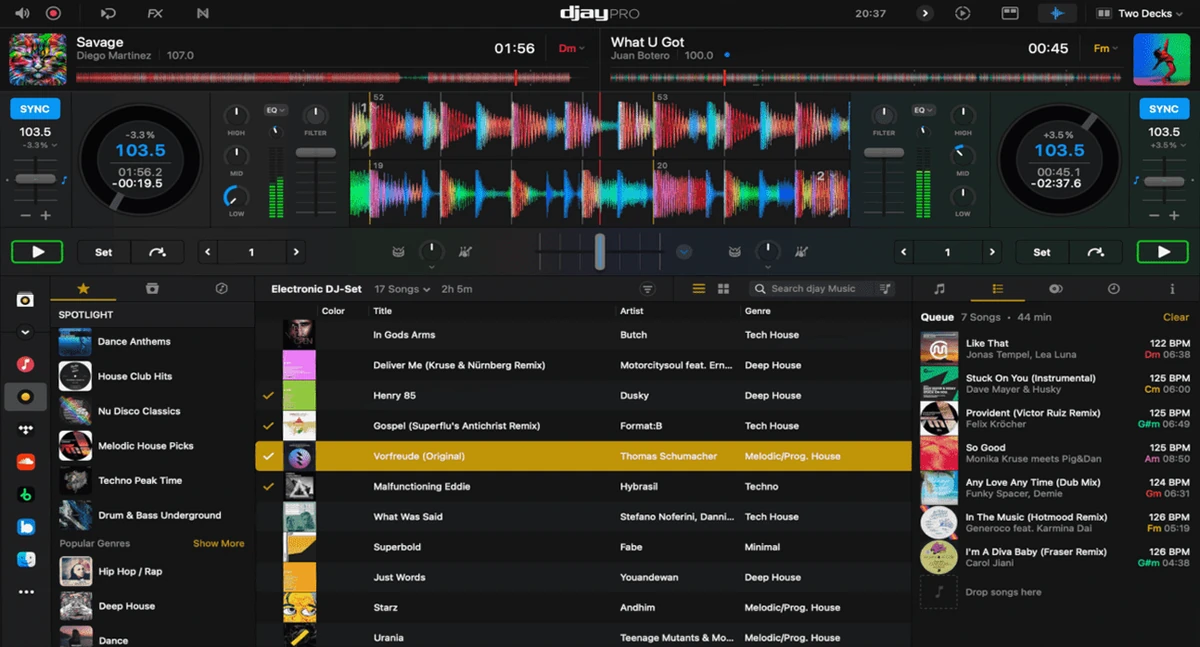
With stem separation support, great touch screen control capabilities (with a mobile-first design) and streaming services support, it’s no longer a secondary choice for mobile DJs, but rather, in my eyes, can already be considered a serious competitor to the main contenders listed above.
The app itself is free to download on Windows, macOS, iOS and Android. djay Pro, which adds the Neural Mix stem separation, Automix, extra FX and wider hardware integration is available as a paid monthly or yearly subscription. On Windows, djay Pro also supports DVS, and as mentioned above, it can export USB drives in the OneLibrary format for compatible AlphaTheta players.
It was also one of the first DJ apps to get the new official Spotify integration back in 2025, and it’s one of the easiest ways to mix your Spotify playlists on a phone or tablet.
6. Mixxx
Mixxx is free and open-source software that is what I would truly call a tinkerer’s choice here. Its community has made custom mappings for many unusual older DJ controllers, and much like VirtualDJ, the software overall has matured a lot over the years. Its full code base is available in its official repository over on GitHub, if you’re interested in its inner workings, or would like to fork and modify the software yourself.
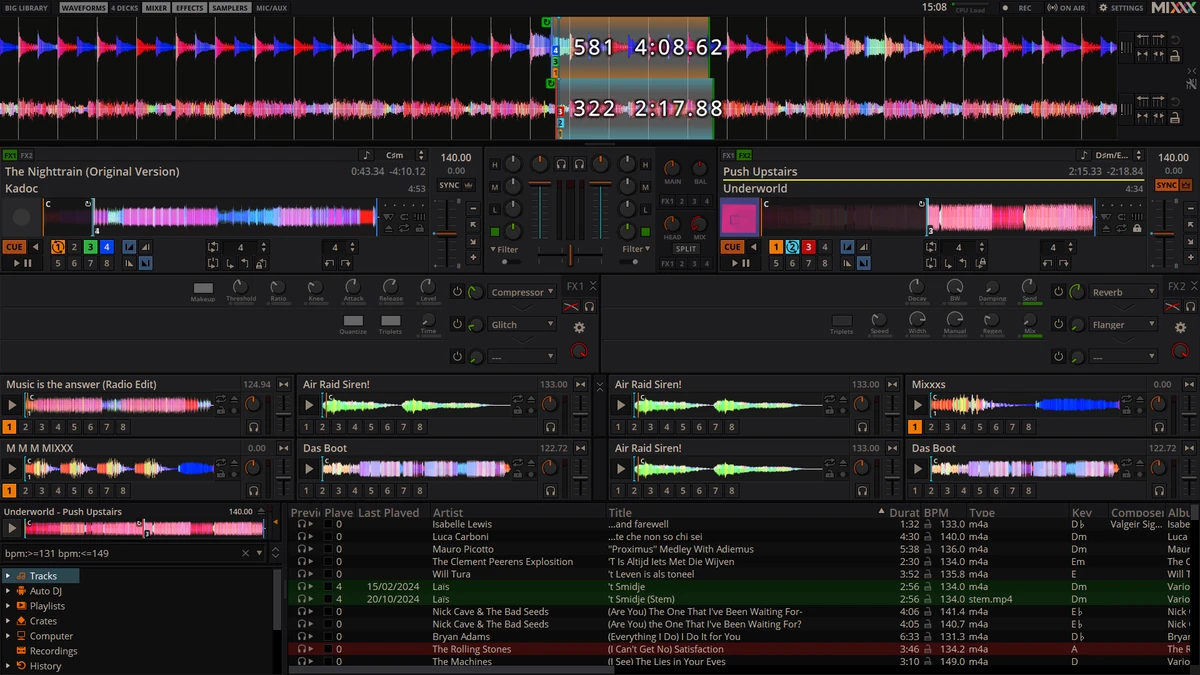
This is also the only one of the six programs here that runs natively on Linux, besides Windows and macOS. You get DVS timecode control, effects, recording, BPM and key detection, and controller mappings you can fully script in JavaScript. The current stable version is 2.5.6. Stems are coming with version 2.6, which is still in beta, and for now they’ll work only with ready-made STEM files rather than with real-time audio separation models.
Still, it’s one of the less beginner-friendly options in the sense that while it has a fair amount of quality documentation available for it, there aren’t really that many tutorials or guides available for it online as of now. If you’re thinking about giving it a try, it’s the only option on our list that is truly free, so if you care about that you should definitely check it out.
Bonus: DJ.Studio (If You’d Rather Build Your Mixes On A Timeline)
DJ.Studio isn’t live DJ software in the same sense as the six programs above, and that’s exactly why it’s here as a bonus. Instead of virtual decks and a crossfader, it lays out your whole mix on a timeline, much like a DAW, so you can place your tracks, shape every transition with volume, EQ, filter and effect automation, and fix any mistake without recording the whole set again.
It also lets you automate away many types of initial edits to give you a good starting point for creating your very first mixtape if you don’t have a DJ controller just yet, or if you want to prepare your mixes in advance.
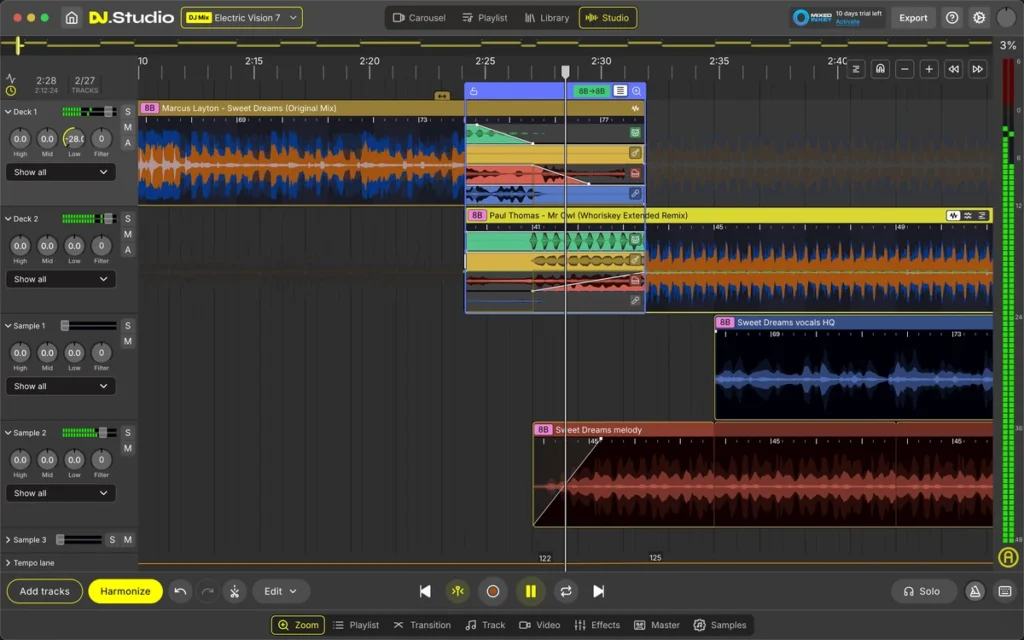
I’m in the middle of testing it right now, and so far it works exceptionally well for putting together mixes you can publish online, like Mixcloud or YouTube mixes, radio shows and podcasts, as well as for planning your live sets at home. Its Harmonize tool can suggest a track order based on key and BPM, using the same harmonic mixing idea Mixed In Key is known for, the optional stem separation splits tracks into drums, bass, melody and vocals right on your computer, and it’s able to read your entire Rekordbox, Serato, Traktor, VirtualDJ or Engine DJ library, along with Beatport and Beatsource libraries as well.
Once your mix is ready, you can export it as an audio file, a video with tracklist timestamps for YouTube, or an Ableton Live project (depending on your license), or send the playlist back to Rekordbox with cue points marking your planned transitions, so you can play it live. It’s one of very few pieces of DJ software built around this angle, and it’s great if you care about polished, repeatable mixes more than about improvising in front of a crowd.
It runs on Windows and macOS, it’s sold as a one-time license with 12 months of updates (or as a monthly subscription), and you can try it free for 7 days. What it doesn’t do is live performance with a DJ controller, so think of it as a companion to your main DJ software, not exactly a replacement for the programs listed above.
Full disclosure: DJ.Studio provided me with a free license for testing.
The Other, Less Popular Options (Including Mobile Apps)
There are also a few other pieces of DJ software, some mentioned in my main free DJ software lineup, and some less popular options that haven’t made it to either of the main lists in the DJ software section. These, in short, are as follows:
- DJUCED – Hercules’ own DJ software for Windows and macOS. It’s free with Hercules controllers and includes real-time stems, while the paid PRO versions add things like use without a Hercules controller and remapping.
- Cross DJ – Mixvibes’ DJ app for iOS, macOS and Android, with real-time stem separation, support for DJ controllers and, since September 2026, Spotify.
- edjing Mix – a popular mobile DJ app for iPhone, iPad and Android, with real-time stem separation and streaming services support.
- YOUDJ – a much simpler two-deck option for Windows, macOS and mobile devices, which also runs directly in your web browser, with a paid PRO upgrade.
Options such as Engine DJ Desktop from Denon DJ, which is used solely for library management (live performance with Engine DJ happens on Denon’s standalone hardware), aren’t taken into account here. Despite that, this list can be pretty overwhelming if you’re learning about all this just now. Take your time to take it in, and search for performance videos that showcase the hardware you plan to get, used with different compatible programs. That’s my best tip.
You might also like: Best Free DJ Software (For Windows and macOS)
So, Which DJ Software Should You Pick?
If you already own a DJ controller, check what it officially supports first, as that might make the choice for you. Otherwise, here is a quick rundown:
- Go with Rekordbox if you own or plan to get Pioneer DJ or AlphaTheta gear, or you know you’ll be playing on club CDJs.
- Go with Serato DJ if your controller was made specifically for it, you’re into scratching and DVS, or you’d like the widest choice of third-party hardware.
- Go with VirtualDJ if you use older or unusual controllers, legacy hardware, devices with custom MIDI mappings, or need video or karaoke mixing.
- Go with Traktor if you have a Traktor Kontrol controller, or you want deep custom mapping and Remix Decks without a subscription.
- Go with djay if you often mix on a phone or tablet, are a mobile-first DJ, or you’d like one subscription for all of your devices.
- Go with Mixxx if you want something completely free and open-source, and you don’t mind some tinkering. Or, if you’re planning to use your hardware on Linux-based systems.
- Add DJ.Studio if you mostly make mixes for Mixcloud, YouTube or radio shows, and you’d like to perfect every transition before anyone hears it.
Remember: changing your software ecosystem is in most cases much easier than compensating for features or controls missing on your newly bought DJ hardware. If you’d like to learn more about the best DJ controllers aimed at beginners, you can jump straight to my latest lineup here: DJ Controllers For Beginners: 6 Best Practical Picks For This Year
And that’s pretty much it for now. Happy mixing!