
Yes. For years you could not. Now, things have changed for the better. Of course, I’m not talking about the Spotify “DJ” mode here. I’m talking about the official integration of the Spotify catalog in DJ software. Here is how it works today.
Spotify Premium & Compatible DJ Software
As per the rather brief official description of the Spotify DJ software integration, the main things you need to start DJing with Spotify music are an active Premium subscription and the latest version of compatible DJ software.
The exact list of supported apps can vary depending on your device, market and licensing availability. The main integrations Spotify originally launched are djay, Rekordbox and Serato, while some regional Spotify support pages now list additional apps including VirtualDJ, Cross DJ and eDJing. I’ll get back to that further below.
When configured properly, this integration will let you access your Spotify playlists, Liked Songs and Spotify-curated playlists inside your DJ software, allowing you to use them in your mixes. You can also search the Spotify catalog directly from supported DJ software.
The main practical limitation here is that Spotify content is online-only. Spotify generally allows compatible DJ software to mix up to 4 Spotify tracks at the same time, although individual applications can introduce lower limits – Serato, for example, currently limits Spotify playback to two decks.
You’re also not able to download Spotify tracks for offline use. A stable internet connection is pretty much a requirement if you want to make use of the available integrations.
The other limitation, and probably the most important for many of you, is that the Spotify DJ integration cannot be used for playing music in clubs or other kinds of venues. The same is true for online live streaming and other public live events. The feature is, as per the Spotify Terms, meant only for private, personal, non-commercial use.
Can You Use Spotify With A DJ Controller Or Standalone DJ Gear?
Yes, in most normal controller setups. Spotify integrates with the DJ software rather than directly with your controller. If your DJ controller is supported by Serato, Rekordbox, djay or another compatible application, you can generally control Spotify tracks loaded into that software in the same way you control other tracks, within the limitations described below.
Standalone DJ gear is a little more complicated. Rekordbox 7.2.18 added the ability to sign into Spotify on compatible CDJ/XDJ and all-in-one DJ systems via Rekordbox. This, however, does not mean that your Spotify tracks can be exported to a USB drive. Spotify tracks still cannot be loaded or played on this hardware through USB EXPORT or LINK EXPORT, which is most likely an anti-piracy measure.
What It Was Like Before
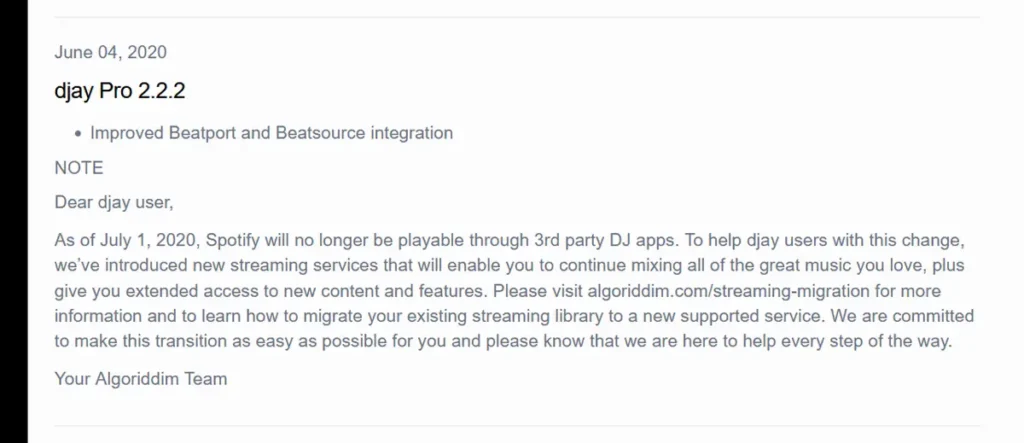
If you remember older guides telling you that you couldn’t DJ with Spotify at all, they weren’t necessarily wrong at the time. Spotify actually used to work with djay and some other third-party DJ apps, but that integration was discontinued on July 1, 2020. Algoriddim announced the change to its users shortly before it happened.
For the next few years, there was no official way to load and mix Spotify tracks directly inside the major DJ applications. This is why you’ll still find plenty of older, outdated articles, videos and forum posts saying that Spotify cannot be used with DJ software.
That changed on September 24, 2025, when Spotify announced new Premium integrations with Rekordbox, Serato and djay. Mobile support for Rekordbox and djay followed in December 2025, while Serato announced the availability of its own Spotify integration in March 2026.
DJ Software Compatible With The Official Spotify Integration
The exact supported software list isn’t identical in every country, but Serato, Rekordbox and djay are the three major integrations Spotify initially launched. Since the initial launch a few more apps have been added, including VirtualDJ, Cross DJ and Edjing Mix. Here is what using Spotify with each of them actually looks like as of now.
Serato DJ (Lite & Pro)
The Spotify integration is available for both Serato DJ Lite & Pro after going through the initial setup, which involves simply logging into your Spotify Premium account. Serato officially requires version 3.3.5 or newer, although there is little reason not to use the latest available version.
After successful setup your Spotify playlists and Liked Songs become visible alongside your Serato crates, while Spotify tracks can also be found using the streaming search function.
The integration has become more capable since it first launched. Starting with Serato DJ 4.0.4, you can create, rename and delete Spotify playlists from Serato, add and remove tracks, reorder them, and have those changes synchronized back to Spotify. Spotify tracks can also be added to Serato crates.
One limitation that Serato introduces here is that you won’t be able to make use of stem separation with tracks that you load from Spotify. You also won’t be able to save the tracks for offline use or use Serato’s internal recording function while mixing Spotify tracks.
There is also a more specific Serato limitation worth knowing about: while Spotify itself permits up to four simultaneous Spotify tracks in compatible DJ software, Serato currently limits Spotify tracks to two decks at once.
At the same time, Serato is the only one of these three main platforms without a mobile version. If you want to DJ with your Spotify library directly from a phone or tablet, djay or Rekordbox will therefore make more sense.
You might also like: Best Free DJ Software (For PC & Mac)
Rekordbox
Long story short, the Spotify integration in Rekordbox that was announced back in September 2025 works on the same general principle as the Serato integration, while sharing several of its limitations.
When it comes to tracks from Spotify, you can’t natively record mixes that contain them, load them into the sampler deck, or utilize the STEMS/track separation feature using them. Spotify tracks also cannot be exported as music files to USB or SD storage.
It used to be that you could use your Spotify tracks and playlists as they were, but you could not import them to your regular Rekordbox library – the “Add to Collection” option was unavailable next to Spotify tracks. Since Rekordbox 7.2.16, however, Spotify tracks can be added to your Collection, and that update also added Spotify support to Automix together with the Your Library and Made to DJ sections.
This wasn’t the last Spotify-related Rekordbox update either. Version 7.2.18 made Spotify tracks available in EXPORT mode and added Spotify account login on compatible CDJ/XDJ and all-in-one DJ systems. There is an important distinction here: Spotify tracks still cannot be copied to a USB/SD drive or loaded onto compatible DJ gear through USB EXPORT or LINK EXPORT.
If you’re choosing between these two programs for more than just Spotify support, I’ve also compared Rekordbox and Serato DJ Pro separately here.
You might also like: How To Record Your Mix In Rekordbox DJ Software (Set Recording Guide)
Algoriddim djay
Algoriddim djay is particularly interesting if you want to use Spotify on a mobile device. Its official Spotify integration is available on iOS, Android, Mac and Windows.
You don’t actually need a djay Pro subscription just to access Spotify. With an active Spotify Premium account, the free version of djay lets you access your Spotify library and use essential mixing features including the mixer, filters and effects, cue points and loops. djay Pro adds features including hardware integration, Automix and additional FX.
There are still important restrictions here, similar to those present in the other pieces of software. Spotify tracks cannot be used with djay’s Neural Mix stem-separation feature, you can’t record mixes containing them, and the Analyze Library offline batch-analysis and Match recommendation features aren’t available for Spotify tracks.
For someone who simply wants to experiment with their existing Spotify library on a phone, tablet or computer, however, djay is one of the easiest ways to get started.
VirtualDJ, Cross DJ, and Edjing Mix
VirtualDJ’s manual has been updated with Spotify Premium support as one of the last pieces of software following up with an official integration. You can access your Spotify tracks via the Online Music browser in the library view. As per usual it comes down to logging into your Spotify account, searching the catalog, accessing playlists and Liked Songs, and loading tracks directly onto VirtualDJ decks.
The Spotify integration was introduced on September 15 2026, alongside with Cross DJ and Edjing Mix. And with that, we finish our roster.
Traktor Is Still Behind
Unfortunately, one of the most interesting software options for those of you dabbling in controller customization and third-party MIDI controllers, as well as the Traktor Kontrol line of gear, is still behind when it comes to Spotify support.
As of September 2026, Traktor Pro 4 does not have an official Spotify integration. Native Instruments currently integrates Beatport streaming directly into Traktor, but there is no equivalent Spotify login or Spotify catalog inside the software.
You might come across third-party playlist-transfer tools and various makeshift solutions online, but these are not the same thing as having official Spotify streaming support inside Traktor. For a direct look at the current differences between the two platforms, see my Serato DJ Pro vs. Traktor comparison.
Spotify support may come to Traktor eventually, but for now, it’s simply not available.
So, Can You DJ With Spotify In 2026?
Yes – as long as you have Spotify Premium, a supported DJ application and a reliable internet connection. Compared with the situation between 2020 and 2025, Spotify has become genuinely useful for practicing, experimenting with tracks and mixing your existing playlists at home.
Streaming your music from Spotify for your DJ mixes, however, comes with a few disadvantages. There is no offline Spotify playback, features such as Stems and recording are restricted in the major DJ apps, and Spotify’s current terms specifically rule out public performances in clubs, venues, events and livestreams. That’s just the nature of music streaming in the context of most DJ software.
For private DJing and practice, though, the answer to the question in the title has finally changed back to a pretty simple yes.