

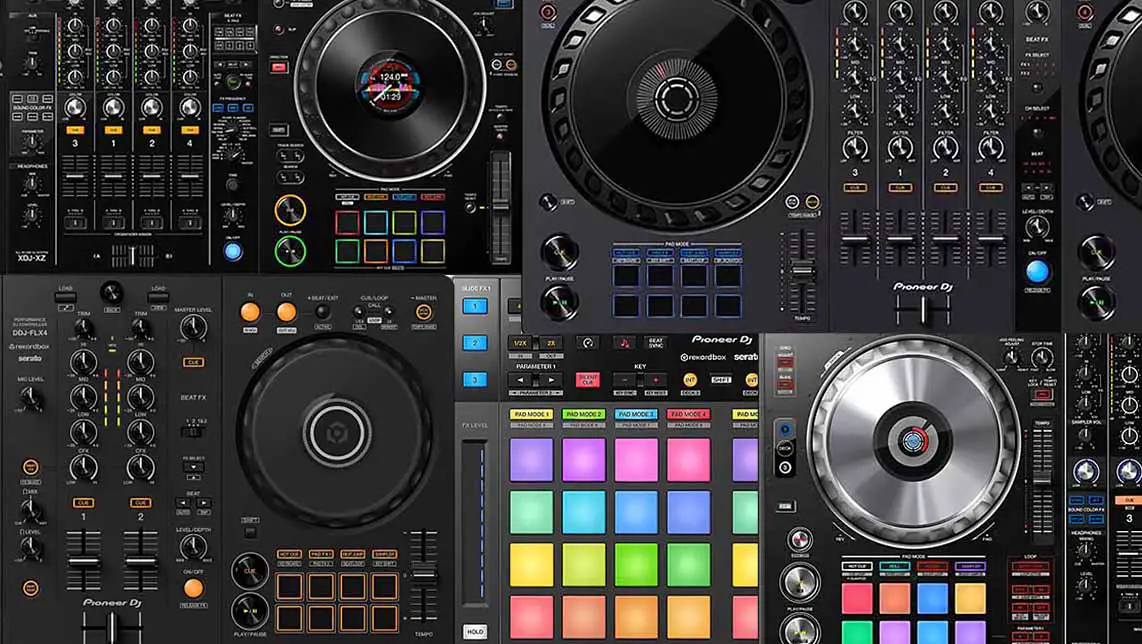
There are now five current laptop DJ controllers I would seriously consider if you want official support for both Serato and Rekordbox: the AlphaTheta DDJ-FLX2, Pioneer DJ DDJ-FLX4, AlphaTheta DDJ-GRV6, Pioneer DJ DDJ-REV5, and Pioneer DJ DDJ-FLX10. This short list starts with the entry-level picks, and ends with the more advanced (and also more expensive) options. If you want to know more, read on!
This web portal is reader-supported and is part of the AliExpress Partner Program, Amazon Services LLC Associates Program, eBay Partner Network, and Guitar Center Affiliate Program. When you buy using links on our site, we may earn an affiliate commission.
Current Serato And Rekordbox Controllers Compared
| Controller | Channels / Decks | Rekordbox Access | Serato Access | Computer Handover | Main Limitation |
|---|---|---|---|---|---|
| AlphaTheta DDJ-FLX2 | 2 / 2 | Performance mode unlock | Lite is free; Pro license needed | 1 device connection | 3.5 mm master output and no mic input |
| Pioneer DJ DDJ-FLX4 | 2 / 2 | Performance mode unlock | Lite is free; Pro license needed | 1 device connection | Entry-level output section |
| AlphaTheta DDJ-GRV6 | 4 / 4 | Performance mode unlock | Pro hardware unlock | 1 device connection | No external deck inputs |
| Pioneer DJ DDJ-REV5 | 2 / 4 | Performance mode unlock | Pro hardware unlock | 2 computer connections | Scratch layout; no line/phono deck inputs |
| Pioneer DJ DDJ-FLX10 | 4 / 4 | Performance mode unlock | Pro hardware unlock | 2 computer connections | Large, costly, and DVS still costs extra |
Note: The software columns above show what the hardware unlocks when connected. They do not include every optional expansion, cloud feature, or subscription service.
What Made The Main List – My Rules Here
A device that’s made it to this list had to be sold as a current controller, officially mapped for both applications, and, from a practical standpoint, useful enough to recommend on its hardware merits.
Every device on this list has an official hardware map, audio routing, and manufacturer support for both applications. You can connect the controller, select it as the audio device, and use the labeled controls without building a MIDI map (or editing it) yourself.
The hardware remains the same, although its control surface is not completely neutral. What this means is that button labels, pad modes, stem separation, effects, browser functions, and jog display information can change with the software. A great example of how this can work is AlphaTheta supplying a Serato overlay sheet with the GRV6, as the Rekordbox-focused Groove Circuit area becomes a Stems FX section in Serato. Not every DJ controller comes with this kind of facilitation.
Both all-in-one standalone DJ systems with support for both Rekordbox and Serato and some older picks are taken into account and mentioned down below, under the main list. Feel free to check these out as well.
AlphaTheta currently makes the dual-compatible hardware on this list under both the AlphaTheta and Pioneer DJ brands, so those are the only two brand names you’ll find below. If you’re interested in a more diverse set of DJ controllers still worth taking a look at this year, you might also be interested in the lineup that I prepared here: Best DJ Controllers: 8 Picks for Every Type of DJ
What “Compatible With Both” Really Means
Your music files can live in one folder and be opened by both programs. The databases around those files, however, are separate. A hot cue saved in Serato will not appear in Rekordbox (and vice versa). The same applies to beatgrid corrections, saved loops, crates, playlists, ratings, and other preparation data.
This will matter to you most if your reason for using Rekordbox is club preparation. Owning a dual-compatible controller does not automatically turn a Serato crate into a prepared USB drive. The tracks still need to be imported, analyzed, checked, and exported from Rekordbox in the library format expected by the players you will use. My Rekordbox Device Library Plus & OneLibrary guide covers the current USB-library side of that job.
1. AlphaTheta DDJ-GRV6 – Best Price/Performance 4-Channel Choice
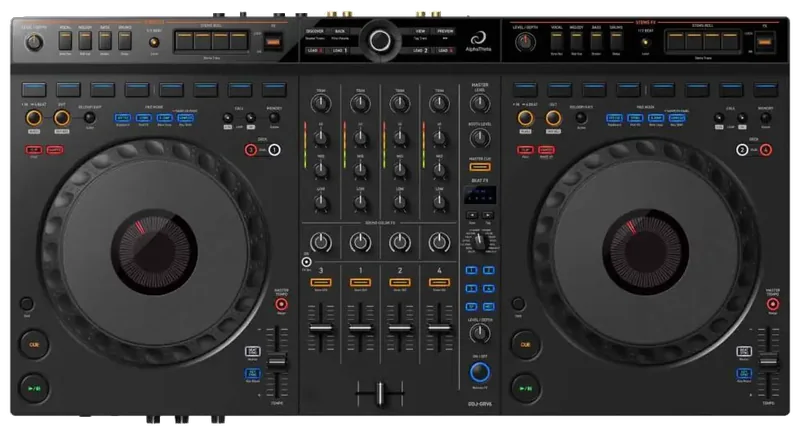
Four-channel controller that unlocks Rekordbox and Serato DJ Pro, with 206 mm jog wheels and a control section supporting Groove Circuit with Rekordbox and Stems FX with Serato.
- No paid upgrade is needed for Serato DJ Pro or Rekordbox Performance mode.
- The pad modes are well covered in both applications.
- Class-compliant USB makes moving between computers less troublesome.
- The second USB-C socket is not a second computer input.
- External players and turntables cannot be mixed through its channels.
| Channels / Decks | 4 channels / 4-deck control |
| Rekordbox | Hardware Unlock for Performance mode on Mac/Windows |
| Serato | Serato DJ Pro Hardware Unlock |
| Software Difference | Groove Circuit in Rekordbox; Stems FX in Serato DJ Pro |
| Jog Wheels | 206 mm capacitive jog wheels |
| Master Outputs | 1/4-inch TRS stereo pair + RCA stereo pair |
| Booth Output | RCA stereo pair |
| USB | 1 x USB-C device connection + 1 x USB-C power input |
| Dimensions | 711.4 x 375.9 x 75.7 mm / 28.0 x 14.8 x 3.0 in |
| Weight | 4.6 kg / 10.2 lb |
The AlphaTheta DDJ-GRV6 is the first controller that I would consider a sensible pick when it comes to dual software support, interesting, above-entry-level feature set and a reasonable price. Serato DJ Pro and Rekordbox Performance mode both unlock when the controller is connected, so you can spend time in each program before deciding which one deserves to become your main library.
In Rekordbox, the four controls above each pad section run Groove Circuit, which is essentially quick access to the Drum Swap, Drum Roll/Trans, Drum Release, and Capture features. Open Serato and that very section handles Stems FX instead. AlphaTheta includes a physical overlay with the controller that you can place over the control surface to make the alternate labels visible. This is one way of dealing with the differing software features assigned to the same hardware buttons in a native way.
Hardware-wise, this is still the “leaner” four-channel option. There are no line or phono inputs, the booth output is RCA, and there is only one computer/device data connection. It is a strong home controller and a workable gig controller when its outputs suit the sound system. It is not, however, built for two-DJ handovers or for combining software decks with turntables. My GRV6 vs. FLX6 comparison goes much further into what changed from its predecessor.
2. Pioneer DJ DDJ-FLX4 – The Best Entry-Level Pick
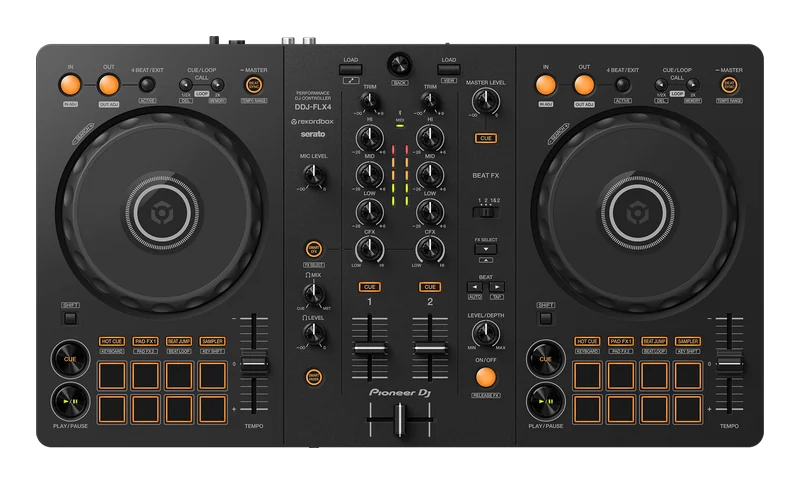
Compact two-channel controller with Rekordbox and Serato DJ Lite access, mobile support, built-in audio outputs, and enough conventional controls to learn properly.
- A proper browser control and full pad rows keep routine work off the laptop.
- Rekordbox and the free Serato DJ Lite are available without an additional software purchase.
- All the features you need for basic mixing.
- Serato DJ Pro requires a separate license or subscription.
- No booth output or balanced master connection.
- Small pitch faders.
| Channels / Decks | 2 channels / 2 decks |
| Rekordbox | Hardware Unlock for Performance mode on Mac/Windows; supported on iOS/Android |
| Serato | Serato DJ Lite is free; paid license or subscription needed for Serato DJ Pro |
| Performance Pads | 8 per deck |
| Microphone Input | 1 x 1/4-inch TS |
| Master Output | RCA stereo pair |
| Booth Output | None |
| USB | 1 x USB-C device connection + 1 x USB-C power input |
| Dimensions | 482.0 x 272.8 x 59.2 mm / 19.0 x 10.7 x 2.3 in |
| Weight | 2.1 kg / 4.6 lb |
I would spend the extra money on the Pioneer DDJ-FLX4 instead of buying the smaller and less capable FLX2 (which we will also get to in a short while) simply because you have not chosen your software yet. The larger controller gives you browse and load controls, eight performance pads on each deck, gain controls, longer pitch faders, a microphone input, RCA master outputs, and separate headphone monitoring.
Rekordbox Performance mode and Serato DJ Lite work without a paid controller license. The trick here is that connecting a DDJ-FLX4 does not unlock Serato DJ Pro. You need to buy or subscribe to Pro if its recording, expanded effects, additional performance features, and broader library tools are the reason you want Serato in the first place. So, if the software limitations of Serato DJ Lite bother you in any way, this might just be a deal breaker for you.
There is no balanced output or separate booth feed on the FLX4, and the basic feature set is easy to outgrow, but overall it’s one of the best devices to get started with if you don’t want to commit to the more expensive and more capable options yet.
3. Pioneer DJ DDJ-REV5 – For Scratch And Open-Format Work
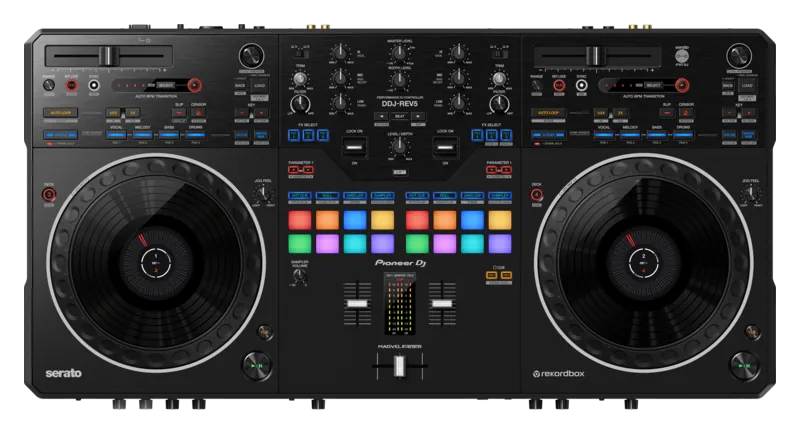
Two-channel, four-deck scratch-layout controller with large adjustable jog wheels, a Magvel crossfader, dual computer ports, and full Serato DJ Pro and Rekordbox unlocks.
- Both Serato DJ Pro & Rekordbox unlock out of the box.
- Dedicated stem buttons remain useful even though each program separates tracks differently.
- Two computer ports make real DJ handovers possible.
- The battle layout is a poor match for someone trying to copy a CDJ/DJM booth.
- Only two physical mixer channels despite four-deck software control.
- The RCA input is AUX, not a pair of line/phono deck inputs.
| Channels / Decks | 2 channels / 4-deck control |
| Rekordbox | Hardware Unlock for Performance mode on Mac/Windows |
| Serato | Serato DJ Pro Hardware Unlock; Pitch ‘n Time DJ voucher included |
| Jog Wheels | Large adjustable mechanical jog wheels with playhead displays |
| Inputs | 1 x RCA AUX + 2 microphone inputs |
| Master Outputs | XLR stereo pair + RCA stereo pair |
| Booth Output | 1/4-inch TRS stereo pair |
| USB | 2 x USB-C computer ports + 1 x USB-C power port |
| Dimensions | 736.0 x 377.2 x 73.4 mm / 29.0 x 14.9 x 2.9 in |
| Weight | 6.2 kg / 13.7 lb |
The Pioneer DDJ-REV5 is the odd one in the best possible way. It gives a Serato-oriented scratch DJ proper Rekordbox support with a proper battle-style control layout. This means that the pitch faders run horizontally above the platters, the pads and effect levers sit in the mixer section, and the Magvel crossfader present on the unit is far more suitable for cuts than the basic faders in the entry-level models.
The REV5 gives you dedicated stem-separation controls, however, the implementation of those varies depending on what software you use. Serato DJ Pro separates a track into vocals, melody, bass, and drums. Rekordbox can use either 3-stem or 4-stem separation, although the REV5’s current Rekordbox hardware mapping still assigns both the MELODY and BASS buttons to the INST part. The available stem controls therefore don’t map identically between the two programs.
Despite the size and balanced outputs present on the unit, it does not feature a fully standalone mixer. There are two microphone inputs and an AUX input, but sadly no phono/line channel inputs for a pair of external decks. The two USB-C ports are still a nice addition here, allowing for quick live handovers. So, to sum it all up, if you’re looking for a controller dedicated to scratch DJs compatible with both Serato & Rekordbox and at the same time you don’t care much about motorized platters, this is most probably your best option right now.
4. Pioneer DJ DDJ-FLX10 – The Most Complete Professional Option
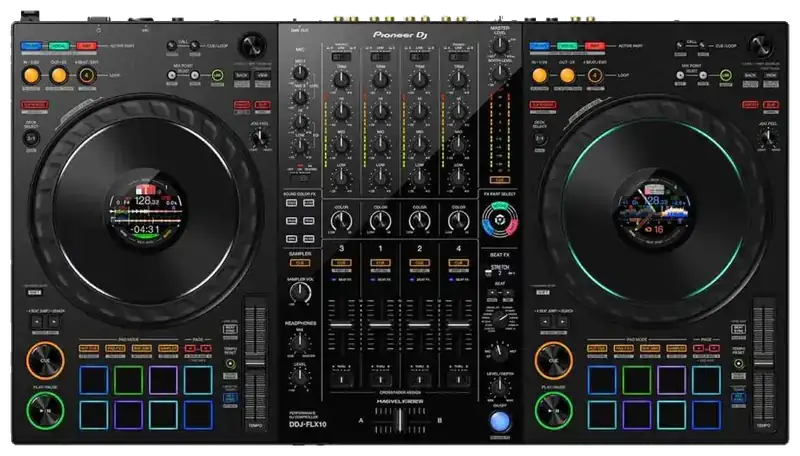
Professional four-channel controller with dual computer ports, external deck inputs, balanced master and booth outputs, detailed jog displays, and dedicated track-separation controls.
- The audio and input section can support a complete working setup.
- Software-specific jog display modes make the differences visible without breaking the basic workflow.
- Two computer inputs allow mixed-software changeovers without repatching USB.
- Rekordbox-only functions leave labeled hardware less useful in Serato.
- DVS requires an eligible Rekordbox plan or a paid Serato expansion.
- The price does reflect its wide feature set.
| Channels / Decks | 4 channels / 4-deck control |
| Rekordbox | Hardware Unlock for Performance mode on Mac/Windows |
| Serato | Serato DJ Pro Hardware Unlock; Pitch ‘n Time DJ voucher included |
| External Inputs | 2 x phono/line RCA + 2 x line RCA |
| Microphone Inputs | 1 x XLR/TRS combo + 1 x 1/4-inch TRS |
| Master Outputs | XLR stereo pair + RCA stereo pair |
| Booth Output | 1/4-inch TRS stereo pair |
| USB | 2 x USB-C computer ports |
| Dimensions | 716.0 x 400.3 x 73.4 mm / 28.2 x 15.8 x 2.9 in |
| Weight | 6.7 kg / 14.8 lb |
The Pioneer DDJ-FLX10 is the most fully-featured, and with that also the most expensive DJ controller on this list. Its mixer accepts four external sources including two phono/line pairs, while the computer decks occupy their own USB channels. This allows you to add two laptops, microphones, separate master and booth systems and external decks to your setup without much trouble.
The track-separation area can control stem features in both programs, although their separation models and modes do differ between Serato and Rekordbox, just as the information displayed on the small screens on top of the jog wheels. The Pitch ‘n Time DJ expansion voucher included with the controller adds Serato key tools to the mix.
DDJ-FLX10 also features a built-in DMX output which is tied to Rekordbox Lighting. Unfortunately it does not become a general-purpose lighting interface when Serato is open. Nevertheless, it’s a good option to have on hand, not present in any other controller on this list.
There is also a catch here when it comes to DVS capabilities. Rekordbox does require an eligible paid subscription for vinyl control, while Serato requires the DVS Expansion Pack or Serato DJ Suite. This means additional costs if you want to use the FLX10 for anything digital-vinyl related.
If you want to know more, my DDJ-FLX10 vs. DDJ-1000 comparison explains where this model stands when evaluated in the light of the previous Pioneer DJ flagship, which, by the way, came in two separate versions, one compatible with Serato, and the other one, with Rekordbox.
5. AlphaTheta DDJ-FLX2 – The Extreme Budget Choice
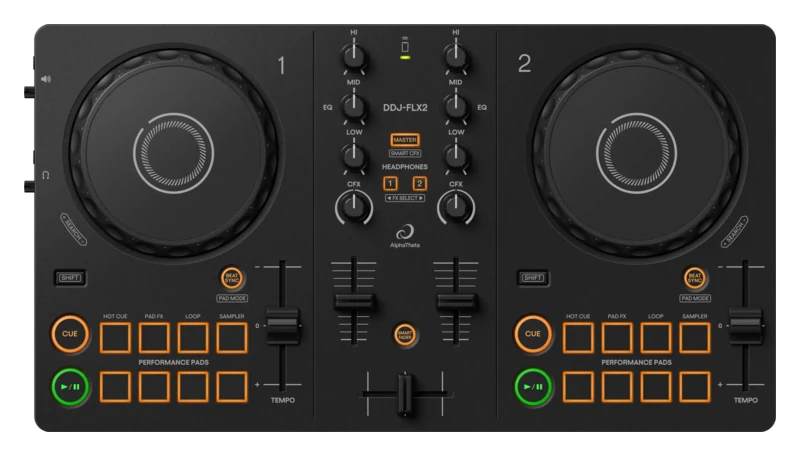
Very small two-channel controller with Rekordbox and Serato DJ Lite support, USB-C and Bluetooth MIDI connectivity, and a built-in headphone and master audio interface.
- The least expensive current way to try both software families on official hardware.
- Small enough to keep as a travel or emergency controller later.
- Has its own master and headphone outputs, unlike the old DDJ-200.
- Serato DJ Pro is a paid upgrade.
- No hardware browsing, gain controls, microphone input, or full eight-pad rows.
- Both audio outputs use 3.5 mm sockets.
- Very limited feature set.
| Channels / Decks | 2 channels / 2 decks |
| Rekordbox | Hardware Unlock on Mac/Windows; supported on iOS/Android |
| Serato | Serato DJ Lite is free; paid license needed for Serato DJ Pro |
| Performance Pads | 4 per deck with multiple modes |
| Master Output | 3.5 mm stereo mini jack |
| Headphone Output | 3.5 mm stereo mini jack |
| USB / Wireless | 1 x USB-C + Bluetooth Low Energy MIDI |
| Power | USB bus powered |
| Dimensions | 383.2 x 208.0 x 48.2 mm / 15.1 x 8.2 x 1.9 in |
| Weight | 1.2 kg / 2.6 lb |
The AlphaTheta DDJ-FLX2 is the least expensive device on this list, but at the same time, the least capable one. Being completely honest, it would not be my first recommendation for somebody who already expects DJing to become a serious hobby, but it can be considered a reasonable portable pick for simpler on-the-go mixing needs. Still, the missing browser, load, gain, microphone, and full pad controls create more laptop/mobile device interaction than I want from a main controller. This one is clearly made to be carried around.
The DDJ-FLX2 fixed the main design problem of the DDJ-200, that is, the lack of a built-in audio interface. The controller features a dedicated soundcard with separate master and headphone sockets, so proper cueing does not depend on a splitter cable. USB-C carries power, control, and audio with supported computers and mobile devices. Bluetooth can handle MIDI controls wirelessly, but I would still stick with the USB connection whenever your setup allows it, especially for a proper, low-latency portable performance setup.
Just as with the FLX4, the free Serato route is Serato DJ Lite. Pro needs a paid license upgrade. That is easy to overlook when the product page lists both versions as compatible. Rekordbox, djay, and Traktor Play broaden the experiment further, but the small control surface remains the limiting factor whichever application is open.
And so, its best long-term role may be as your second controller. At 1.2 kg, it is easy to keep in a bag for library work, hotel-room preparation, lessons, or another occasion like this. Get the FLX4 if this will be your only controller, and the FLX2 instead when minimum size and price are the point. And that’s pretty much it!
You might also like: Serato DJ Lite vs. Pro (12 Most Important Differences)
What About XDJ Systems With Serato And Rekordbox Support?
More than a few all-in-one systems can control both Serato and Rekordbox when used with a computer. Their standalone features also add to the price, making them more expensive on average than laptop-only controllers.
The real value of these devices is standalone playback from USB media, onboard screens, and a hardware-centered library workflow. If your laptop will remain open for every set, in most cases you won’t find a standalone system more desirable, unless you really want some specific features that are not available anywhere else.
If, however, you’re interested in these options, here are, in my eyes, the most worthwhile standalone all-in-one systems that are also able to function with both Rekordbox and Serato when connected to a computer.
| System | Standalone Decks | Rekordbox | Serato | Reason To Choose It |
|---|---|---|---|---|
| AlphaTheta XDJ-AZ | 4 | Supported | Serato DJ Pro supported | Full-size current club-style layout and Pro DJ Link |
| Pioneer DJ OPUS-QUAD | 4 | Supported | Serato DJ Pro supported | Four independent standalone decks with additional per-deck displays. |
| Pioneer DJ XDJ-RX3 | 2 | Supported | Serato DJ Pro supported | Mature two-deck professional standalone workflow |
| AlphaTheta XDJ-AN | 2 | Supported | Serato DJ Lite free, Serato DJ Pro subscription needed | Lower-cost current entry into standalone Rekordbox playback |
The distinction between controller mode and standalone use is important. A given system can expose four Serato or Rekordbox software decks while offering a different number of decks from USB. It can also require different library formats or provide fewer computer-mode functions than a dedicated controller. I compare many of these important details in my full guide to the best DJ controllers with built-in screens, so you can learn much more about that over there.
Older Dual-Compatible Controllers: What Is Still Worth Knowing?
The used market contains quite a few cross-compatible Pioneer DJ devices. The main problem here is that some of these devices do require particular versions of drivers that can be, for instance, incompatible with some newer versions of operating systems.
There also is an issue with some of them dropping the support for newer versions of DJ software as years go by. Verify all these on a case-by-case basis, and make sure that you won’t be trapped with older software workflows, or locked out of new features if you decide to go with the older second-hand options.
| Older Hardware | Original Dual Support | Current Alternative | My Take |
|---|---|---|---|
| DDJ-FLX6 / FLX6-GT | Rekordbox + Serato DJ Pro | DDJ-GRV6 | Still a reasonable entry-level pick at the right price; the GRV6 has the stronger current control layout and support path. |
| XDJ-XZ | Rekordbox + Serato DJ Pro | XDJ-AZ | A serious used system, but standalone USB playback remains limited to two decks. |
| DDJ-SX2 | Rekordbox + Serato DJ Pro | DDJ-FLX10 or DDJ-REV5 | Capable although very dated hardware. Consider only after checking drivers and exact OS/software support. |
| DDJ-SZ | Rekordbox + Serato DJ Pro | DDJ-FLX10 | Large and well connected, but also very dated by today’s standards, which comes with software compatibility/driver problems. |
Also, be careful with similar names here. The DDJ-SX2 supports both programs, but the newer DDJ-SX3 is a Serato-only controller. The original DDJ-SZ had Rekordbox support, while the DDJ-SZ2 did not follow the same compatibility path. The DDJ-1000 and DDJ-1000SRT were separate Rekordbox and Serato versions rather than one dual-software model. The DDJ-REV7 used to be a Serato-focused controller until getting late support for Rekordbox in early 2024. Most of this naming confusion comes from the older, pre-AlphaTheta Pioneer DJ lineup, where very similar model names could have completely different software support.
So, to sum it all up, if you decide to go for older hardware, always check the latest drivers available for your operating system, as well as the version of Serato or Rekordbox you plan to install. It’s reasonably easy to overlook.
The Bottom Line
For most people who genuinely expect to use or try out both Serato DJ Pro and Rekordbox, I would go for the DDJ-GRV6. It avoids the need to buy a separate Serato DJ Pro license, and gives you four full mixer channels to work with, alongside a pretty extensive set of features. The DDJ-FLX4 would be the better pick if you can work with two channels and entry-level controls.
The DDJ-REV5 can be the more convincing choice for scratch and open-format performance. The DDJ-FLX10 is the most fully-featured advanced pick that I would go for if budget wasn’t an issue. The DDJ-FLX2 somewhat earns its place through price and portability, although I wouldn’t really advise you to get it if you don’t care much about its portability and low price.