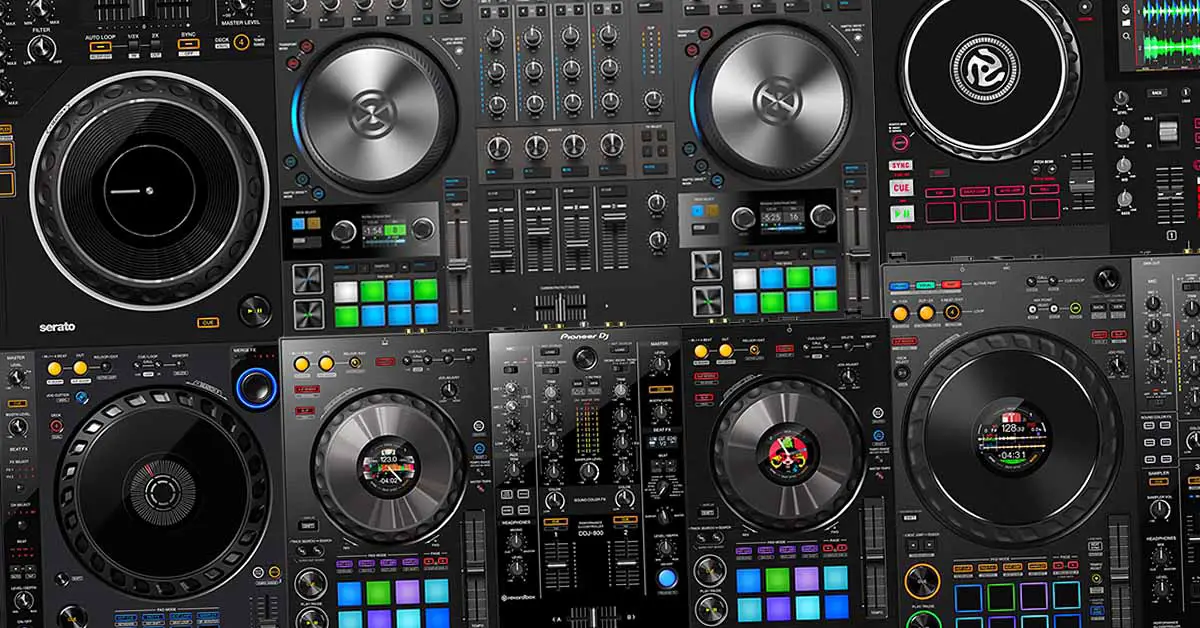
Getting it out of the way, I would start with the Pioneer DJ DDJ-FLX4 if you have a suitable laptop and wired headphones on hand. It has the controls you need to learn proper two-track mixing, and you can record your practice sessions in desktop Rekordbox without buying a software subscription. You do not need to jump straight to a four-channel controller to take DJing seriously. Still, there are quite a few different options out there, and if you have a moment to spare, I can tell you much more about them.
All controllers listed here have a built-in audio interface and a separate headphone output. All six main picks also need a computer, or a supported mobile device where noted. None plays music straight from a USB stick. I cover the laptop-free option separately, because buying a controller and buying a complete standalone system are very different expenses.
For standalone controllers, you want to look here instead: 10 Best DJ Controllers With Built-In Screens
This web portal is reader-supported and is part of the AliExpress Partner Program, Amazon Services LLC Associates Program, eBay Partner Network, and Guitar Center Affiliate Program. When you buy using links on our site, we may earn an affiliate commission.
Beginner DJ Controllers At A Glance
If you want to quickly jump to the controller you like, click the names of the controllers on the left. Scroll down for the full list!
| Controller | Reason To Choose It | Starting Software | Main Compromise |
|---|---|---|---|
| Pioneer DJ DDJ-FLX4 | General two-deck practice | Rekordbox | Short tempo faders |
| Hercules Inpulse 500 | Guided beatmatching; extra inputs | DJUCED / Serato Lite | Pro costs extra in Serato |
| AlphaTheta DDJ-FLX2 | Low-cost compact setup | Rekordbox / Serato Lite | No physical trim or browse |
| Pioneer DJ DDJ-REV1 | Scratch-style layout | Serato Lite | An older pick |
| Numark Mixtrack Platinum FX | Tempo control; jog displays | Serato Lite | Serato DJ Pro costs extra |
| Traktor MX2 | Traktor controls and license | Traktor Pro 4 | Separate power supply |
Note: The software column here shows a sensible free starting option, not necessarily every app the controller can work with.
You might also like: Best Free DJ Software (For Windows and macOS)
Before You Spend Your Whole Budget On a Controller
The thing with these devices is that you need to price the whole working setup, not just the controller. A cheaper unit that requires a software upgrade, for example from Serato DJ Lite to Pro, if your controller doesn’t unlock it, can cost you more than the next model up. Here is the order I would work through before comparing deals, whether new or second-hand:
- Put wired headphones in the budget. You need to hear the incoming track separately from the track playing out loud. Ordinary wired headphones can get you started; an expensive DJ-branded pair is not a requirement. Still, make sure that you have a pair that you will be able to comfortably use on one ear only, for longer periods of time, or in louder environments.
- Check the speakers you already own. Powered speakers or a hi-fi with an appropriate line input may be enough. Passive speakers need an amplifier. Do not buy another audio interface just to connect headphones and speakers, as all of the controllers listed below already provide those outputs (and keep in mind that some controllers out there don’t).
- Leave something for music, add-ons and… cables. A streaming-service subscription or access to a DJ record pool, paid software extensions, a USB adapter or the correct speaker cable can all be separate expenses. Always check what kind of software the controller you’re aiming for comes with/unlocks.
With that out of the way, let’s get straight to the current lineup of the best DJ controllers to start out with today. The first one you probably already know.
You might also like: Can You DJ Without a DJ Controller? (Here Is How…)
1. Pioneer DJ DDJ-FLX4 – My First Choice For Most Beginners
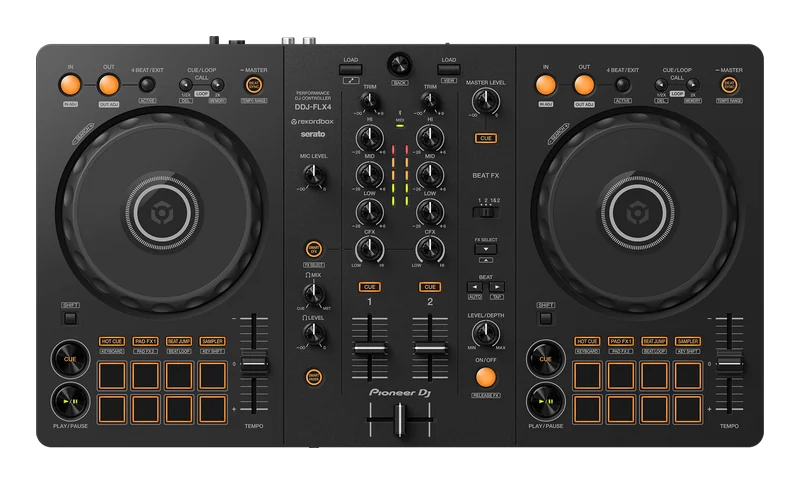
A two-deck controller with separate gain, EQ, filter and loop controls, plus a free Rekordbox route for learning and recording on a laptop.
- Practice gain matching and EQ transitions on dedicated controls.
- Record local-file mixes in desktop Rekordbox without a paid plan.
- Browse and load tracks without reaching for the mouse.
- Short tempo faders leave less physical travel for small adjustments.
- Serato Pro is an extra purchase if you choose that route.
- No separate booth output for a second speaker level.
| Mixer | 2 channels; 3-band EQ and trim per channel |
| Recommended Starting Software | Rekordbox Performance mode on PC/Mac |
| Other Main Options | Serato DJ Lite/Pro; djay; mobile support depends on app/device |
| Speakers | RCA stereo master output |
| Headphones | 3.5 mm stereo output |
| Microphone | 1 x 6.35 mm input |
| Connection / Power | USB-C; computer bus power or external USB power for mobile setups |
The Pioneer DDJ-FLX4 is the direct successor to the DDJ-400. It’s extremely simple to use, even if you don’t have any prior experience with DJ equipment. Find a track, cue it in your headphones, set its level, match the tempo and bring it into the mix. It gives you physical controls for those exact jobs, just like its predecessor did – for a very good price.
Smart Fader and Smart CFX are fun additions to the basic set of functions that the FLX4 has to offer. Its short tempo sliders are workable, the jog wheels work great, and the scaled-down Beat FX strip gives you the ability to play around with quite a few basic effects, depending on the DJ software you choose.
For a new laptop setup I would use Rekordbox first, although the controller is also compatible with Serato DJ Lite out of the box. Hardware Unlock gives you full access to Rekordbox Performance mode while the controller is connected. Serato is another option, but Pro is a paid upgrade, and the base option is quite limited in terms of features. You can also use the FLX4 with the Rekordbox mobile app.
If you already want to save some money and are considering a used DDJ-400, my FLX4 versus DDJ-400 comparison covers what actually changed between these two models. A working DDJ-400 does not suddenly become useless because the FLX4 exists and, despite being long discontinued, it is still quite a capable device even today. Moving on.
2. Hercules DJControl Inpulse 500 – A Great Pioneer/AlphaTheta Alternative
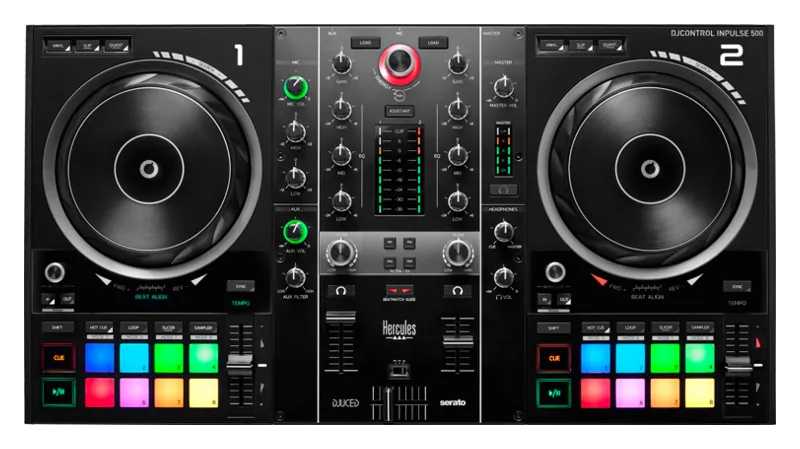
A laptop controller with tempo and beat-alignment guide lights, a microphone input with EQ, and an auxiliary input for another audio source.
- Guide lights separate tempo correction from beat alignment.
- DJUCED gives you a recording route without a Serato Pro upgrade.
- Mic EQ and an aux input add practical house-party options.
- Guide lights depend on the software analysis being correct.
- The standard package does not include Serato DJ Pro.
- An aux input does not make it a two-turntable mixer.
| Mixer | 2 channels; 3-band EQ and gain |
| Starting Software | DJUCED and Serato DJ Lite; Serato Pro costs extra |
| Learning Tools | Tempo and Beat Align guides |
| Speakers | RCA stereo pair and 6.35 mm jack pair |
| Headphones | 3.5 mm and 6.35 mm outputs |
| Inputs | Microphone with 2-band EQ; aux via RCA or 3.5 mm |
| Connection / Power | USB connection to PC/Mac; USB powered |
The Hercules DJControl Inpulse 500 is the first interesting alternative I would consider if you don’t feel pressured to get a device from the Pioneer DJ/AlphaTheta roster.
Its Tempo and Beat Align guides are beginner-friendly features that can help you distinguish between changing the playback speed and nudging two beats into line. The idea is to use the lights to check a correction, then practice without watching them. While I personally don’t think it’s really that useful, as beatmatching by ear is relatively easy to learn anyway, it’s nice that the feature is there.
The DJUCED software is a good reason to buy the Hercules, and it comes with a lot of learning materials that are really great when starting out. You do not have to start in the more limited Serato DJ Lite and immediately budget for Pro just to record a local-file mix or practice in peace. You still have the option to download both supported apps and see which interface you prefer.
The extra inputs earn their place at a house party. A wired external player can feed the aux input, and the microphone has its own EQ. This is honestly quite impressive on an entry-level device like this. If the 500 is too expensive locally, you can also check out the Inpulse 300 MK2. It keeps the beatmatch guides, gain controls and DJUCED/Serato Lite support. For someone who does not need the 500’s microphone and aux section, that is a very sensible saving.
3. AlphaTheta DDJ-FLX2 – For A Smaller Budget Or A Small Desk
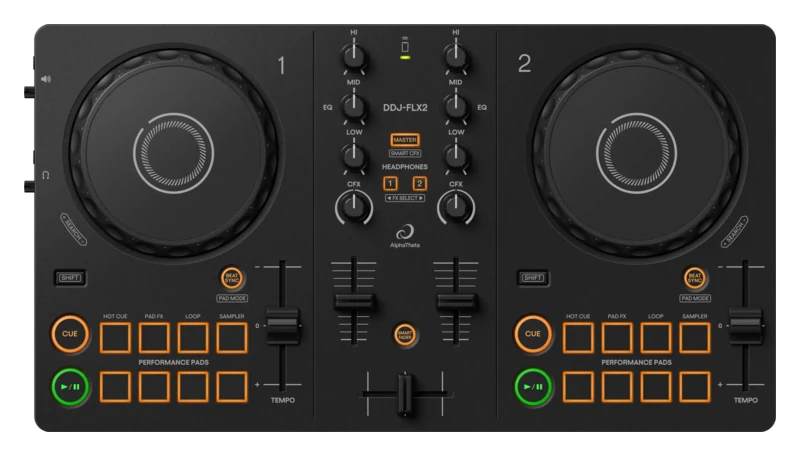
A compact controller that keeps two decks, three-band EQ and separate speaker/headphone outputs, while moving browsing and some level control into the app.
- Separate master and headphone sockets keep cueing straightforward over USB.
- Three-band EQ supports normal bass-swap practice.
- Easy to fit beside a laptop on a small table.
- No physical trim knobs or track-browse encoder.
- No microphone input for announcements.
- Mobile power and audio routing need checking for your exact device.
| Mixer | 2 channels; 3-band EQ; no physical trim knobs |
| Starting Software | Rekordbox Performance mode or Serato DJ Lite on PC/Mac |
| Mobile Use | Supported Rekordbox/djay setups; verify OS and connection |
| Speakers | 3.5 mm stereo master output |
| Headphones | Separate 3.5 mm stereo output |
| Microphone | No input |
| Connection / Power | USB-C; Bluetooth MIDI in supported mobile setups |
The AlphaTheta DDJ-FLX2 is, in a sense, a cut-down version of the DDJ-FLX4 and, at the same time, a direct successor to the DDJ-200. It is perfectly capable of real two-track practice. Compared to the older DDJ-200, however, it features a built-in audio interface, so a wired USB setup can provide separate speaker and headphone feeds without a need for a DJ splitter cable.
Because it is much cheaper than the FLX4, it comes with a few disadvantages. You’ll browse tracks on the screen of your laptop or your smartphone (as you won’t find any library controls here), and there are no physical trim knobs for matching the track input levels. Automatic gain can help with different track volumes, but it does not give you the same hands-on practice as having a gain control above each channel.
That is why I would always try and stretch to an FLX4 if you’re already committed to learning, but not insist on it when the price difference would swallow the headphone budget. You can learn basic track phrasing, cueing and bass swaps on the FLX2 without much trouble. But there is no point in hiding the fact that this is an ultra-portable device that you will most likely outgrow reasonably fast.
4. Pioneer DJ DDJ-REV1 – For Learning Scratch-Style Controls
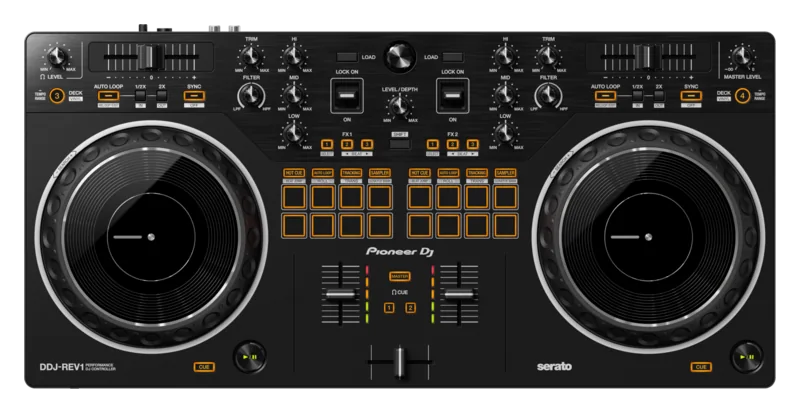
An affordable battle-layout controller with horizontal tempo sliders, pads in the mixer section and lever FX, for practising cuts and scratch routines in Serato.
- Mixer-positioned pads keep cue triggers close to the crossfader.
- Lever FX can be applied briefly and released.
- Larger jog surfaces than the FLX4.
- The platters do not rotate under motor power.
- The layout differs from most club-style mixing tutorials.
- Serato Pro recording and other Pro features cost extra.
| Mixer | 2 physical channels |
| Starting Software | Serato DJ Lite; paid upgrade for Pro |
| Jog Wheels | 154 mm, touch-sensitive and non-motorized |
| Control Layout | Horizontal tempo sliders; mixer-positioned pads |
| Speakers | RCA stereo master output |
| Headphones | 3.5 mm stereo output |
| Microphone | 1 x 6.35 mm input |
| Connection / Power | USB-B to PC/Mac; USB bus powered |
The Pioneer DDJ-REV1 can still be worth your attention if you are an aspiring scratch DJ but don’t want to jump straight into some more expensive DJ controllers with motorized platters (yes, they do exist). Its pads sit near the crossfader, the tempo sliders run horizontally at the top, and the FX levers are within reach of the mixer hand. This resembles a so-called battle-style layout, commonly used by scratch DJs with traditional or digital vinyl setups. One bummer is that the REV1 comes only with Serato DJ Lite, which as you already know, is pretty limited in terms of what it can do.
If your first planned lessons are mainly long transitions on a club-style layout, I would choose the FLX4 instead. If scratch routines are something you want to pursue instead, the REV1 might interest you more, if anything, because of its control layout. I go through even more differences between these two in my full FLX4 versus REV1 comparison. Neither layout prevents you from learning the other style later, so the choice, aside from the smaller technical details, is largely a matter of personal preference.
You might also like: DJ Controllers Explained! (What Do All These Buttons Do?)
5. Numark Mixtrack Platinum FX – A Budget Pick From Numark
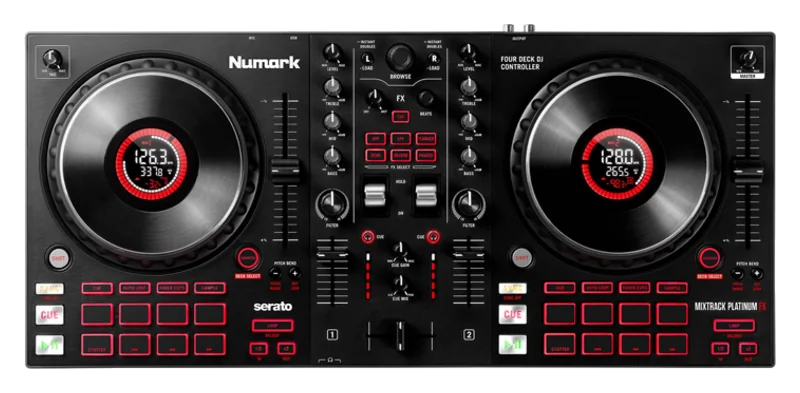
A two-channel controller with long tempo faders, jog displays and FX paddles. Four-deck control is available through layers with the appropriate software.
- Long fader travel helps when making small tempo changes.
- Track-time displays let you check the remaining track length at the jogs.
- Dedicated loop buttons keep loop practice off the laptop keyboard.
- Two mixer strips must be shared when controlling four decks.
- The displays cannot browse a library or replace the laptop screen.
- Serato DJ Pro adds to the price if you need its extra functions.
| Mixer / Decks | 2 channels; 4 layered decks in Serato DJ Lite/Pro |
| Starting Software | Serato DJ Lite; Pro requires a paid license |
| Jog Wheels | 6-inch touch-sensitive jogs with track-info displays |
| FX Control | Two paddles and dedicated effect selection |
| Speakers | RCA stereo master output |
| Headphones | 3.5 mm and 6.35 mm outputs |
| Microphone | 1 x 6.35 mm input |
| Connection / Power | USB-B to PC/Mac; USB bus powered |
The Numark Mixtrack Platinum FX is a very reasonable budget pick that comes with everything you might want from an entry-level DJ controller, plus a few neat bonuses such as full-size pitch faders and FX paddles. The jog displays show track information, including time remaining, which is a direct upgrade over its sibling, the Numark Mixtrack Pro FX.
One thing that has to be mentioned here is that our Platinum contender here comes with Serato DJ Lite and doesn’t automatically unlock Serato DJ Pro. Four-deck layering is available in Serato DJ Lite, while Pro adds features such as recording and extra cues and loops. The cheaper Pro FX is also worth considering. If you do not need jog displays or optional digital four-deck playback, you can easily save some money. Both devices are on par with entry-level equipment from AlphaTheta & Denon. Numark has really come a long way when it comes to its hardware.
6. Native Instruments Traktor MX2 – Something a Little Bit Different

A two-channel Traktor controller with the full Traktor Pro 4 license, dedicated effects controls and performance pads for loops, cues and later experimentation.
- Traktor Pro license included.
- Separate mixer and deck FX controls leave room to explore effects.
- Both common headphone plug sizes connect directly.
- Needs the included power supply as well as the USB cable.
- Costs more than the simplest controllers here.
- A Traktor-focused purchase, not great if you already lean towards Rekordbox or Serato.
| Mixer | 2 channels; gain and 3-band EQ |
| Included Software | Full Traktor Pro 4 license with new hardware |
| Pads | 8 per deck; cues, loops, stems and Pattern Player modes |
| Speakers | RCA pair and 3.5 mm stereo output |
| Headphones | 3.5 mm and 6.35 mm outputs |
| Microphone | 1 x 6.35 mm input |
| Connection / Power | USB-C to PC/Mac plus supplied power adapter |
I would consider the MX2 when Traktor itself appeals to you. If you haven’t decided on what DJ software you want to use yet, the simplest way I can put it is: Traktor is to Serato and Rekordbox what Linux is to Windows. You get a lot of customizable performance tools, extensive MIDI mapping/remapping capabilities, the ability to incorporate third-party controllers into your workflow with relative ease, and much more. The full version of Traktor Pro 4 is included with the MX2. No unnecessary paid upgrades, and no features locked behind software expansions.
The power supply is an important difference here, as this is the only device in this lineup that does require an external power brick. That is fine on a permanent desk, but quite understandably less convenient if you wanted a controller to use wherever your laptop battery lasts. This newer entry in the dedicated Traktor controllers product line also has a more minimalist exterior than the previous hardware in the series, which some people seem to have strong opinions on.
Choose it because you want to learn Traktor. If you’re not sure why you would need it, it’s probably going to be best to look towards the other picks instead. And with this one, our list is concluded!
You can learn much more about Traktor here: Serato DJ Pro vs. Traktor – DJ Software Comparison
What If You Don’t Have A Laptop?
The first route would be the mobile-only route. Check whether a supported phone or tablet setup with the FLX4, FLX2, or another controller that has support for a mobile DJ app of your choice covers the things that you actually want to do. Keep in mind that mobile DJ apps differ substantially from their desktop counterparts, so check that the app supports the features you need.
Another route is the standalone route. If you want USB-stick playback with the screen and music engine built into the hardware rather than remaining phone-bound, I would start by checking out the Numark Mixstream Pro+. It runs Engine DJ, has built-in speakers for nearby listening, and can play from USB/SD media without a laptop attached. Its purchase price is higher, but it can make sense if the alternative is buying both a controller and a computer.
The built-in speakers on the Mixstream Pro+ do not replace a sound system for a crowded party, and the controller needs external power to run. Pay more for a battery model only if you actually need to use it away from a socket. A slightly more portable (and more capable) standalone alternative with a built-in battery from Denon, in a similar form factor albeit without built-in speakers, would be the Denon DJ PRIME GO+, which is also a very good pick here.
You can compare more of these arrangements in my standalone and built-in-display buying guide. Turns out you don’t really need a premium club-style system just to stop using a laptop.
Cheap Alternatives, Used Deals And What I Would Skip
The Inpulse 300 MK2 and Mixtrack Pro FX are the first cheaper alternatives I would check against the main picks. Even cheaper hardware like the Numark Party Mix lineup can also be enough to try DJing, especially at a good used price, but once again, the simpler your starter device is, the faster you’ll outgrow it.
A used DDJ-400 remains worth considering if it is meaningfully cheaper than a new FLX4. The DDJ-200 is a harder recommendation because it has no built-in audio interface, and I consider it to be largely obsolete by today’s hardware standards. By the time you account for its output arrangement, you may prefer paying a little more for a controller with separate audio sockets.
I would leave the DDJ-FLX10, four-channel Traktor controllers and full-size standalone rigs out of a standard beginner budget, unless you really know where you’re heading with a larger purchase like this. They are, in my opinion, as easy to learn as entry-level hardware, but that alone does not necessarily justify the extra expense.
How I Chose These Specific Controllers
To make this short, compiling this lineup was a mixture of recalling my first experiences with DJ controllers which started with the original DDJ-SX back in ~2016, answering questions from many beginner DJs on DJGear2k over the years, and following the industry trends when it comes to both entry-level and advanced DJ gear all the way up until today.
While I really think that there are virtually no wrong choices when it comes to entry-level DJ hardware available on the market these days, I think that it’s always valuable to get that extra insight before settling on a device that is going to be your first companion on your DJing journey, whether you’re planning to be a hobbyist bedroom DJ, or make a living working in the industry.
With that said, I hope that this guide was helpful to you. If so, I’m glad I could help!
My Final Pick
The DDJ-FLX4 would be my purchase for a first laptop-based setup unless the Inpulse 500’s software or extra inputs, the REV1’s scratch layout or Traktor itself gave me a specific reason to choose something else. On a tighter budget, I would compare the FLX2 with the Inpulse 300 MK2 and leave enough for headphones and music.
Do not replace a working controller just because you have stopped being a beginner. You can keep learning on two decks for a long time. Get the cueing right, keep your levels under control and listen back to your mixes. Those improvements will naturally carry over to whatever hardware you use next.
And speaking of more hardware, you might be interested in this: Best DJ Controllers This Year: 8 Picks for Every Type of DJ