

Pioneer XDJ-RX3 and DDJ-1000 are both high-end DJ devices with extensive feature sets, but they’re made for quite different use cases. The XDJ-RX3 is the better pick if you want standalone USB playback, while the DDJ-1000 makes more sense if you need 4 mixer channels and full-size mechanical jog wheels. The DDJ-1000 is now discontinued, but it’s still a very capable option on the used market. In this detailed comparison based on my own experience I will focus on the most important differences between the two to help you choose the right one for you!
This web portal is reader-supported and is part of the AliExpress Partner Program, Amazon Services LLC Associates Program, eBay Partner Network, and Guitar Center Affiliate Program. When you buy using links on our site, we may earn an affiliate commission.
Pioneer DDJ-1000 vs. Pioneer XDJ-RX3 – full specification comparison
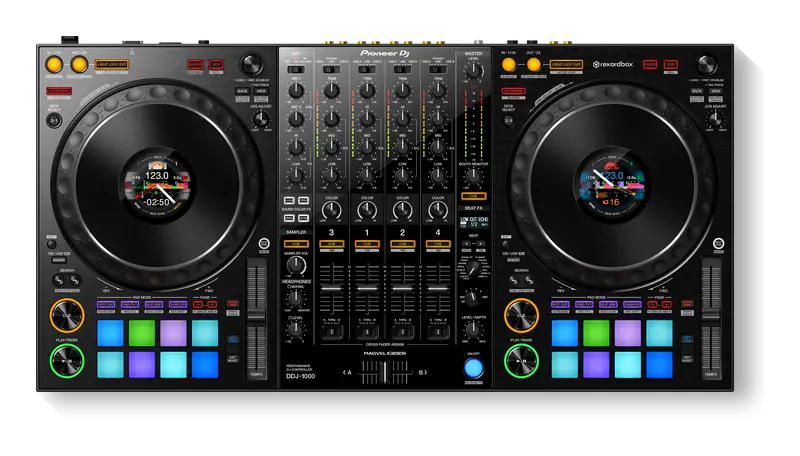
Laptop-based 4-channel performance controller with full-size mechanical jog wheels, color On Jog Displays, a MAGVEL crossfader, extensive DJM-style hardware FX, and four external mixer inputs.
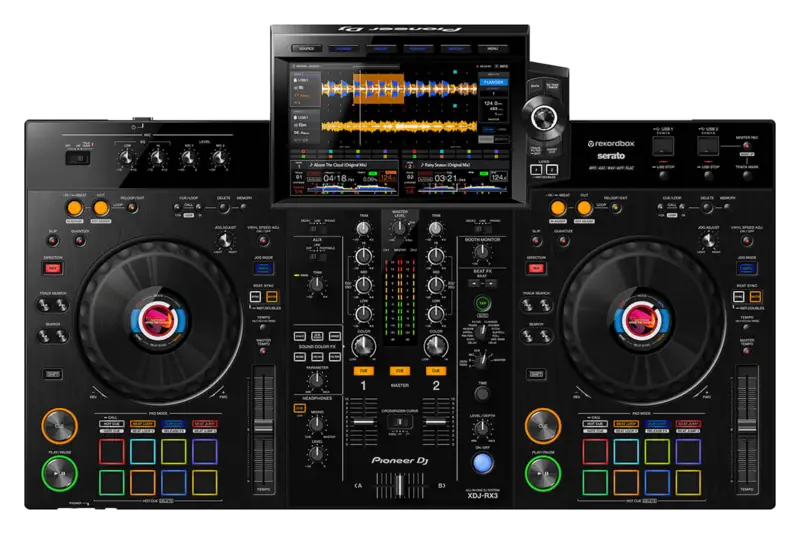
2-channel all-in-one system built for laptop-free USB performance, pairing a 10.1-inch touchscreen with 154 mm capacitive jogs, Release FX, expanded Sound Color FX, and Rekordbox/Serato controller modes.
| Specs | Pioneer DDJ-1000 | Pioneer XDJ-RX3 |
|---|---|---|
| Mixer channels | 4 | 2 |
| Standalone performance | No – standalone mixer only | Yes – 2-deck USB playback |
| Standalone mixer | Yes – 4 external line/phono inputs | Yes – external line/phono inputs available |
| Main display | No central screen – color LCD On Jog Displays | 10.1-inch high-resolution touchscreen |
| Jog wheels | Full-size mechanical jog wheels with tension adjustment | 154 mm / 6.06-inch capacitive jog wheels with Color On Jog Displays and tension adjustment |
| Performance pads | 8 RGB pads per deck | 8 RGB edge-lit pads per deck |
| Pad / key features | Pad FX, Keyboard, Key Shift, Beat Jump, Sampler and more | Standalone pad modes + 8 Release FX; no standalone Key Shift / Key Sync |
| FX controls | 14 Beat FX + 4 Sound Color FX + customizable Rekordbox Pad FX | 14 Beat FX + 6 Sound Color FX + Release FX + on-screen FX controls |
| Sound Color FX | Pitch, Filter, Dub Echo, Noise | Space, Dub Echo, Sweep, Noise, Crush, Filter |
| Master output | Balanced XLR stereo pair x1 + RCA stereo pair x1 | Balanced XLR stereo pair x1 + RCA stereo pair x1 |
| Booth output | 1/4-inch TRS stereo pair x1 | 1/4-inch TRS stereo pair x1 |
| Microphone inputs | 2 | 2 |
| USB / computer | 2 x USB Type-B | 2 x USB Type-A media ports + 1 x USB Type-B computer port |
| Dimensions | 708.0 x 361.4 x 73.4 mm / 27.9 x 14.2 x 2.9 in | 728.1 x 469.5 x 118.4 mm / 28.67 x 18.48 x 4.66 in |
| Weight | 6.0 kg / 13.2 lb | 9.3 kg / 20.5 lb |
| Software / apps | Rekordbox Hardware Unlock, VirtualDJ; separate DDJ-1000SRT variant for Serato DJ Pro | Rekordbox Hardware Unlock, Serato DJ Pro |
Pioneer DDJ-1000
For:
- High-end professional DJ controller.
- Club layout resembling a CDJ x DJM mixer setup.
- Jog wheels based on the ones present on the Pioneer CDJ-2000 line of club DJ players.
- Great selection of audio FX and easy access to customizable Rekordbox Pad FX banks.
- Pitch-based FX accessible from the device’s performance pads.
Against:
- Can’t function as a standalone DJ controller.
- Doesn’t support Serato DJ Pro software – the DDJ-1000SRT does.
- Lacks the Sweep, Crush and Space Sound Color FX found on the XDJ-RX3.
Pioneer XDJ-RX3
For:
- Standalone features + a 10.1-inch touch display.
- Supports both Serato DJ Pro and Rekordbox software out of the box.
- Adds the Space, Sweep and Crush Sound Color FX, while the DDJ-1000 instead has Pitch.
- Gives you access to unique Release FX that are not available on the DDJ-1000.
Against:
- Only 2 mixer channels on board.
- A little bit more bulky than the DDJ-1000.
- No pitch-based FX accessible in Standalone Mode.
2 vs. 4 mixer channels

While the two devices don’t really differ that much in size, there are many potential deal-breaking differences between them in terms of their features. One of them has to do with the number of mixer channels available on each of them.
The Pioneer DDJ-1000 features 4 mixer channels. In essence, this is a great option for both people who tend to make use of all four mixer channels during their live mixes (for example for multi-channel mashups), and people who often use 3rd party audio devices with their DJ controllers and need separate mixer inputs for these.
Pioneer XDJ-RX3 features only 2 mixer channels, so if you’re used to mixing on a 4-channel DJ controller and you want to use the unique feature set of the RX3, you will have to settle for some compromises.
Both devices feature 2 dedicated microphone inputs, separate MIC 1 and MIC 2 level controls, and a 2-band microphone EQ.
The Pioneer XDJ-RX3 is a fully standalone device
Yes, the Pioneer XDJ-RX3 is a fully standalone DJ controller and can be used live without being connected to a laptop. The only trick here is that if you want full waveform and analysis data on the RX3, you should analyze your tracks in Rekordbox before exporting them to USB. The RX3 can play unanalyzed tracks, but it doesn’t analyze them in advance on the unit itself.
With the Pioneer DDJ-1000, you will need a laptop with compatible DJ software to be connected to the DJ controller to perform. While the mixer on the DDJ-1000 can function in a standalone mode (act as a regular audio mixer with both the decks disabled completely), the controller itself doesn’t have all-in-one standalone mixing capabilities.
This is one of the reasons that the DDJ-1000 doesn’t feature a full-scale LCD display on the top panel, and settles with two small displays on the jog wheels. XDJ-RX3 on the other hand has a nice 10.1-inch touchscreen that enables you to efficiently manage your track library live (among other things).
Both the DDJ-1000 and XDJ-RX3 can work with Rekordbox and act as Hardware Unlock devices for Performance mode, but only the RX3 also officially supports and unlocks Serato DJ Pro.
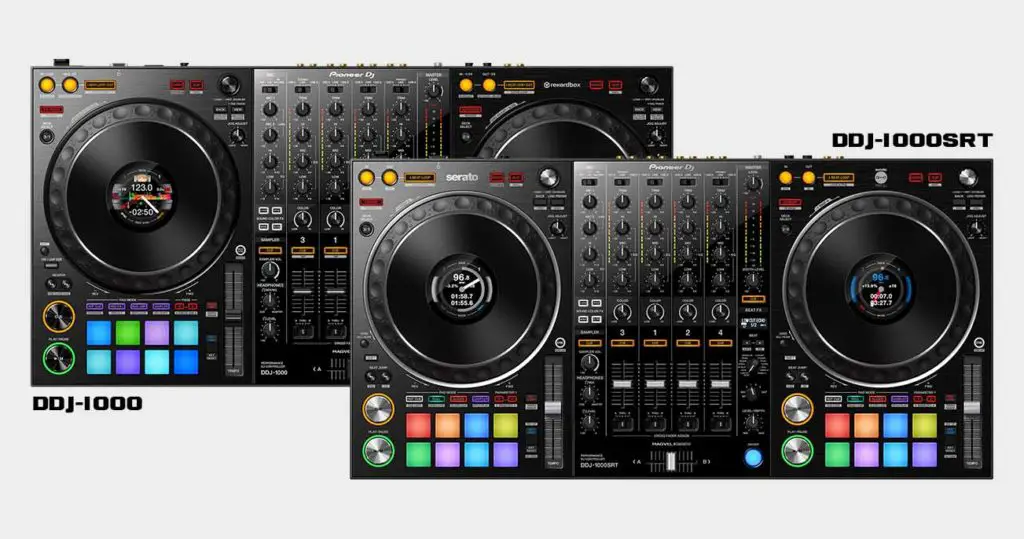
The DDJ-1000 actually has an official Serato DJ Pro compatible counterpart – the Pioneer DDJ-1000SRT. Check out my comparison of the DDJ-1000 and its SRT version – there are more differences here than just the software compatibility matter.
Mixer & Audio FX Differences

Both controllers give you access to extensive sets of audio FX, but there are some important things to note here.
Pioneer DDJ-1000 doesn’t have the Sweep, Crush and Space effects in its Sound Color FX section. The XDJ-RX3 has all of these, besides the Pitch effect which is exclusive to the DDJ-1000 here.
On the RX3 used standalone or with Serato, you won’t have access to the two fully customizable Pad FX banks that are present on the DDJ-1000.
In total, there are 6 Sound Color FX and 14 Beat FX available on the XDJ-RX3 (+8 Release FX), and 14 Beat FX and 4 Sound Color FX on the DDJ-1000 (+up to 16 customizable Pad FX in two user banks).
On the Pioneer XDJ-RX3, you have a few additional ways to activate audio FX (such as using its main touchscreen). The device still has a nice unique selection of pad effects (labeled Release FX) which work really well in the standalone mode.
Performance pads & Deck sections
Performance pads are of almost exactly the same quality on both devices. The only thing that differs here is their visual appeal and the available pad modes.
One notable thing here, is that the Pioneer DDJ-1000 features two distinct pad modes that the RX3 doesn’t have – the Keyboard mode and the Key Shift mode. Both of these allow you to dynamically pitch your cue points and transpose your tracks during the live playback. This is not possible on the Pioneer XDJ-RX3 in the standalone mode.
Pads on the DDJ-1000 feature full surface RGB backlight, while the ones on the XDJ-RX3 – simple RGB backlight on their edges.
| Pioneer DDJ-1000 on Ebay: |
| Pioneer XDJ-RX3 on Ebay: |
Jog wheels
The Pioneer DDJ-1000 wins in terms of the jog wheel size, and for many – in terms of their overall quality. This is because that while the XDJ-RX3 only features two half-size capacitive jog wheels, the DDJ-1000 has two full-size mechanical platters taken straight from the Pioneer CDJ-2000NXS player series!
The differences between capacitive and mechanical jog wheels are vast, so be sure that you pick the controller which will fit you the best in that matter!
Both the devices feature a dedicated jog wheel tension adjust knob on their front panels.
If you want a jog wheel experience at least a little bit closer to an actual Pioneer DJ club setup, you really should go for the DDJ-1000!
DJ software compatibility

Both controllers give you access to extensive sets of audio FX, but there are some important things to note here. It will act as a hardware unlock device for both pieces of software, so you can try both of these out and use them without paying a dime.
When it comes to the Pioneer DDJ-1000, it was designed primarily for Rekordbox, where it still works as a Hardware Unlock device. Its Serato-specific counterpart is the Pioneer DDJ-1000SRT.
Both the XDJ-RX3 and DDJ-1000 can also be used with VirtualDJ with an appropriate license, and with Traktor via custom MIDI mapping.
Good alternatives for the DDJ-1000 & XDJ-RX3
Among the most relevant newer alternatives are the Pioneer DDJ-FLX10 if you want a modern 4-channel laptop controller, the AlphaTheta XDJ-AZ if you want 4-deck standalone playback, and the Denon DJ PRIME 4 G2 if you’re open to Engine DJ. The older XDJ-XZ is also still worth a look on the used market.
Here are the ones I’d look at first:
- Pioneer DDJ-FLX10 – the newer 4-channel option if you like the DDJ-1000 workflow but don’t need standalone playback.
- Denon DJ Prime 4 – a 4-channel fully standalone DJ controller from Denon – a direct competitor of the Pioneer XDJ-XZ and in a sense – the XDJ-RX3.
- AlphaTheta XDJ-AZ – a much newer 4-deck standalone system with full-size jog wheels.
- Denon DJ PRIME 4 G2 – a current 4-deck standalone alternative running Engine DJ.
- Pioneer XDJ-XZ – An older, but still very much capable 4-channel controller with 2-channel standalone capabilities.
The Conclusion – Which one is better in the end?
So, which one of these should you choose? Well, it depends on quite a few things. The Pioneer DDJ-1000 will in general be better for those of you who actually need and use 4 mixer channels in their live sets, and who don’t need the standalone experience to get the most of their DJ controller. Just keep in mind that it’s now discontinued and will usually be a used-market purchase.
The Pioneer XDJ-RX3 on the other hand, is a great choice for all those of you who’d like to have access to standalone features while still being able to use your DJ controller with your laptop, and can get over not having a 4-channel mixer present on their device.
If you’re considering the DDJ-1000 today, also check out my DDJ-FLX10 vs. DDJ-1000 comparison. The FLX10 is the newer 4-channel option, with support for both Rekordbox and Serato DJ Pro, dedicated stem controls and USB-C connectivity.